
Building Enterprise-Grade Workflows with Temporal


Modern enterprise software is shifting from transient request–response patterns to durable execution—where business processes keep running correctly even when infrastructure fails. Coordinating microservices across unreliable networks, managing long-running business processes, and scaling complex AI pipelines often forces teams to hand-roll retries, persistence, and recovery logic. Databases, queues, and ad-hoc state machines can work, but they frequently push developers into infrastructure concerns instead of core business logic.
Temporal represents a shift in this landscape: a developer-centric platform designed to keep workflows moving despite crashes, network failures, or downstream outages. Building an enterprise-grade workflow system requires more than deploying a cluster; it requires clear architectural boundaries, deterministic constraints, and operational strategies that hold up at scale.
In this article, we’ll define what “enterprise-grade” means for workflows, outline a reference architecture for Temporal, and cover the operational realities—history limits, retries, determinism, versioning, SLAs/observability, disaster recovery, and migration patterns—so teams can run durable execution safely at scale.
Enterprise-Grade Workflow Requirements: Reliability, Auditability, and Scale
In an enterprise, “workflow” rarely means a simple sequence of steps. It means mission-critical business execution that must keep moving even when infrastructure, networks, and downstream services inevitably fail. That is why the enterprise standard is not “it usually works” but “it continues correctly under failure, at scale, under audit”.
Temporal’s model makes state, progress, and recovery first-class concerns. It does this through a persisted Event History and an execution model that rehydrates state through replay—so teams spend less time writing bespoke recovery code and more time encoding business rules as workflows-as-code (using existing languages, tooling, and CI/CD).
A workflow system is enterprise-grade when it provides five guarantees:
- 1. Correctness under failure (durable progress)
If the system crashes mid-execution, the workflow must resume without losing its place. Temporal’s model uses Event History as a durable record that enables recovery after crashes or failures. - 2. Safe change management (evolvable long-running logic)
Enterprise workflows often outlive deployment cycles. Temporal warns that code changes to Workflow Definitions used by running executions can cause non-deterministic errors; therefore a versioning strategy is required. - 3. Operational clarity (observable and searchable state)
When workflows wait on human actions, vendor outages, or time, the ops organisation must still be able to answer: What is it waiting on? What should we do next? Who owns it? Xgrid explicitly calls out the trap of opaque sleeping workflows and prescribes Query Handlers for support visibility - 4. Controlled blast radius (isolation + prioritisation)
Enterprise platforms isolate workloads using task queues, rate limits, and separate worker fleets. Temporal best practices recommend logically separating Task Queues by workload to prevent starvation and to scale independently. - 5. Recoverability (clear RPO/RTO and tested playbooks)
Enterprise systems do not rely on hope. Disaster recovery goals, failover processes, and tested runbooks need to be explicit, repeatable, and validated through drills.
Takeaway: “Enterprise-grade” is architectural. You’re designing for correctness under failure, safe evolution over time, and operational control—not just a happy-path sequence of steps.
Temporal Reference Architecture: Control Plane vs Worker Compute Plane
A practical enterprise mental model is:
- Temporal = workflow control plane (state, history, scheduling, task routing)
- Your workers = compute plane (running workflow/activity code in your environment)
This separation of concerns offers significant security and scalability benefits. Because the workers run within the enterprise’s VPC or on-premises data center, sensitive data and application logic never leave the organization’s control. The control plane only interacts with workers via secure gRPC connections, orchestrating the flow of work without ever having to “see” the internal details of the business logic.
This reference architecture allows for independent scaling; the control plane can scale horizontally to handle millions of state transitions, while the worker fleet scales based on the specific CPU and memory requirements of the workflows and activities being executed.
Architecture Layers at a Glance
Below is a “who owns what” map you can use when reasoning about scaling, security boundaries, and failure domains.
| Architectural Layer | Components | Primary Responsibility |
|---|---|---|
| Control Plane | Frontend, Matching, History, Worker Service | State management, task queuing, orchestration, and persistence. |
| Compute Plane | Workflow Workers, Activity Workers | Execution of deterministic business logic and non-deterministic side-effects. |
| Persistence Layer | Cassandra, MySQL, or Postgres | Durable storage of Workflow Mutable State and Event History. |
| Visibility Layer | Elasticsearch or OpenSearch | Indexing of search attributes for filtering and monitoring. |
Optional Scaling Pattern: Cell-Based Isolation
Organizations often leverage this architecture to build “cell-based” isolation models, where different business units or services operate in isolated cells to minimize the blast radius of any potential failure.
For enterprises navigating this complexity, Xgrid’s architectural services provide the expertise needed to design and deploy these multi-tenant, high-scale environments. By positioning Xgrid as a strategic partner, enterprises can ensure their reference architecture is optimized for both performance and compliance from the outset.
Solving Long-Running Workflow Challenges with Temporal Durable Execution
Workflow orchestration becomes difficult when processes run for days or weeks, span multiple dependencies, and must survive deploys, worker restarts, timeouts, and partial outages without losing business state. Temporal addresses this by persisting an append-only Event History that enables workflows to pause safely, resume deterministically, and produce an audit trail.
Practical design rule: Treat a Workflow as the authoritative state machine for the business process, and push side effects to Activities with explicit retry policies and idempotency boundaries—so operational chaos doesn’t leak into business correctness.
Durable Timers, Signals, and Human-in-the-Loop Workflows
Long waits are where queue-based orchestration typically breaks (cron drift, lost jobs, resource pinning). Temporal Workflows can set durable timers (sleep() / timer() depending on SDK) that persist through Worker or platform downtime. Workflows can “sleep for months”, and sleeping is resource-light—supporting “millions of Timers off a single Worker.”
Long-running workflows also need reliable interaction points:
- Signals: push data into a running workflow (e.g., “Approve,” “Payment confirmed”). This enables human-in-the-loop patterns where the workflow waits for an external decision before continuing.
- Queries: inspect workflow state without changing execution history, enabling real-time visibility for support and operations.
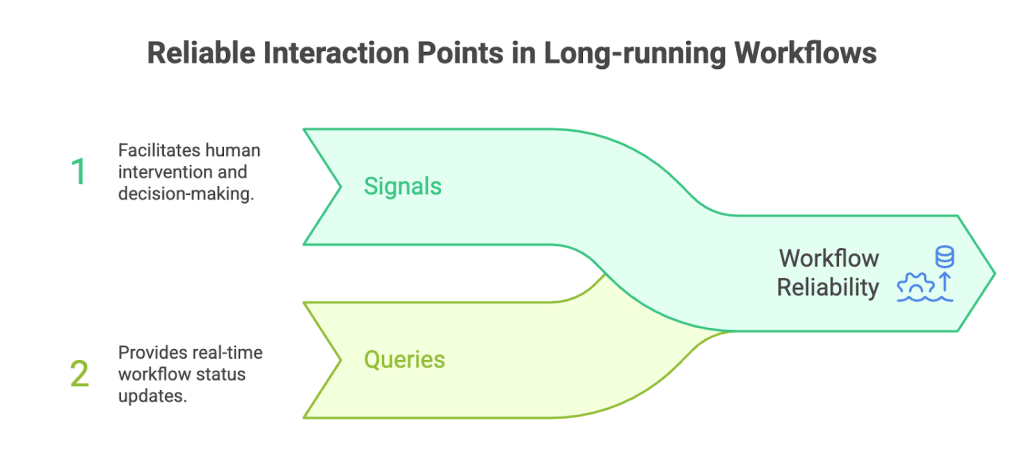
Takeaway: Design human-in-the-loop and long-wait steps as first-class workflow states, with Signals for inputs and Queries for operational visibility.
Managing Workflow History: Continue-As-New and Lifecycle Boundaries
Every action taken by a workflow is recorded as an event in its history. While this event-sourcing model provides the foundation for durability, it also introduces physical limits. Temporal enforces a hard limit of 51,200 events or 50 MB per workflow execution. If these limits are exceeded, the workflow is terminated to prevent the worker from becoming overwhelmed during history replay.
For truly long-lived or “infinite” processes, Temporal provides Continue-As-New, which atomically closes the current run and starts a new run (same Workflow ID) with cleared history. This is analogous to a tail-recursive function call; the current state is passed as an input to the new execution, ensuring the logical process continues uninterrupted while the physical history remains bounded. Managing these lifecycle boundaries is critical for “Entity Workflows”—such as a digital twin or a long-term subscription—where the process must survive far beyond the history limit of a single execution.
Key Limits to Plan Around
Use this table as a checklist for lifecycle boundaries and throughput patterns.
| Feature | Constraint / Limit | Strategic Implication |
|---|---|---|
| History Event Limit | 51,200 events per run | Triggers mandatory Continue-As-New. |
| History Size Limit | 50 MB | Requires efficient payload management. |
| Signal Capacity | 10,000 per execution | Limits high-frequency updates to a single workflow. |
| Timer Duration | 100 years | Enables extreme long-term scheduling. |
| Concurrent Ops | Recommended < 500 | Optimizes worker throughput and memory. |
Download the Long-Running Workflow Lifecycle Checklist (PDF) for an implementation-ready version of this table (history limits, Continue-As-New triggers, payload guardrails, and scale thresholds).
Retries Without Retry Storms: Idempotency and Backoff for Temporal Activities
During dependency outages, naïve retries can amplify load into a retry storm. Temporal retries Activities with exponential backoff by default and encourages retrying failed Activities rather than restarting entire workflows.
To make this enterprise-safe:
- Bound retries with a custom Retry Policy (max attempts + max interval)
- Cap total retry time with Activity timeouts (especially Schedule-To-Close)
- Design Activities for idempotency (Activities are at-least-once and may re-run even after “success” if a worker crashes before completion is recorded)
A practical idempotency pattern is using an idempotency key derived from stable identifiers (often combining the Workflow Run ID and Activity ID) so external side effects can be safely retried.
Takeaway: Retries are only safe at enterprise scale when Activities are idempotent, bounded, and instrumented—otherwise outages turn into cascading failures.
If you want to standardise these production defaults (timeouts, retry/backoff posture, idempotency scaffolding, and observability) across a large workflow estate, Xgrid positions forward-deployed Temporal engineers to embed with teams and ship/stabilise production-grade workflows.
Deterministic Execution in Temporal: Avoiding Non-Determinism
Temporal workflows must be deterministic because Temporal doesn’t store a snapshot of worker memory. Recovery happens by replaying workflow code and verifying that decisions match recorded history. If workflow code takes a different path during replay (e.g., by using wall-clock time, random numbers, or direct network I/O), it can trigger a non-determinism error and halt execution to prevent state corruption.
Determinism Rules of Thumb: What Belongs in Workflows vs Activities
Deterministic execution means that given the same history of events, the workflow code must produce the exact same sequence of commands. This places specific constraints on what can happen inside a workflow definition versus an activity.
- Inside the Workflow: Logic must be entirely predictable. Developers must not use standard library calls for time, random numbers, or direct network I/O. Instead, they must use SDK-provided wrappers like workflow.Now() or workflow.SideEffect() which record the results in the history so they remain stable during replay.
- Inside the Activity: Code can be as non-deterministic as needed. This is where API calls, database writes, and file system interactions take place. Activities are not replayed; their results are merely recorded, making them the safe zone for non-deterministic behavior.
A common rule of thumb for enterprise architects is to treat the workflow as a pure orchestration layer that simply coordinates a sequence of activities. If a business decision depends on the current time or a fluctuating exchange rate, that value should be fetched in an activity and passed back to the workflow, ensuring the decision remains deterministic for the remainder of the execution.
Common Non-Determinism Pitfalls (and How to Design Around Them)
The most common traps are operational, not theoretical:
- Refactors that reorder commands (e.g., moving an Activity before a timer) can break replay because the next expected command no longer matches history.
- SDK-specific edge cases exist around timer semantics (for example, changing timer durations in certain ways can be replay-unsafe depending on language/SDK).
Design around this with a versioning strategy:
- Prefer Worker Versioning for routing old executions to compatible code
- Use patching/version APIs when workflows must run longer than a deployment’s lifespan
Validate changes via replay testing before and during deployments
Takeaway: Determinism is the contract that makes durability possible. Treat non-determinism errors as deployment- or change-management failures, not “runtime flukes.” Xgrid highlights using immutable Event History for deterministic replay debugging plus Prometheus/Grafana dashboards for failure spikes and latency thresholds. If you want the production-grade playbook for debugging, replay-safe telemetry, and ‘stuck RUNNING’ workflows, download the Temporal Observability in Production whitepaper.
Enterprise Workflow Versioning in Temporal: Safe Deployments for Long-Running Code
At enterprise scale, you typically need two lines of defense:
- 1. Deployment routing strategy(Worker Versioning)
- 2. Code-compatibility strategy(patch branching using version APIs)
Temporal supports both, and organizations often combine them depending on workflow lifespan and change frequency.
Worker Versioning with Build IDs: Pinning, Routing, and Deployment Topologies
Worker Versioning uses Build IDs to tag worker deployments and lets the platform route tasks based on the version that started the workflow.
- 1. Workflow Pinning: This ensures that a workflow execution is “pinned” to the specific Build ID on which it started. It will complete its entire lifecycle using the workers that run that specific build, eliminating the need to write complex branching logic for older executions.
- 2. Deployment Topologies: This enables “Rainbow Deployments,” where multiple versions of a worker fleet run simultaneously. As older workflows complete, their corresponding worker versions can be “drained” and eventually decommissioned.
This strategy is ideal for blue-green deployment models, providing an instant rollback path and ensuring that “Version 2” logic never accidentally breaks a “Version 1” history.
GetVersion and Patching Patterns: Evolving Workflow Logic Over Time
For workflows that must run for extremely long periods—longer than the lifespan of a typical deployment—the GetVersion API provides a mechanism for “patching” logic in place. This allows developers to create logical branches in the code:
- Implementation: The GetVersion call checks if a specific “Change ID” exists in the workflow history. If it doesn’t (indicating an older execution), it follows the old logic. If it does (indicating a new execution), it follows the new logic.
- Markers: Once a version is established, Temporal records a “Marker” in the history. All future replays will see this marker and consistently follow the correct branch, regardless of how the code evolves in the future.
Deprecation of these patches is a critical maintenance task. Once an organization is certain that no active workflows remain on the old version—verified via visibility queries—the old code branch and the GetVersion call can be safely removed.
Replay Testing in CI/CD: Preventing Non-Determinism Before Release
Replay testing (e.g., via WorkflowReplayer utilities) verifies that new code remains compatible with existing histories before it ships. Capturing representative production histories and replaying them against updated worker code catches replay-breakers early and turns determinism into a CI/CD gate instead of an on-call emergency.
Takeaway: Mature versioning combines routing (which code gets which workflows) with compatibility (whether code can replay old histories), enforced via replay testing.
Designing SLAs for Temporal Workflows: What to Measure and Why
SLA design is where workflow orchestration stops being architecture and becomes an on-call contract.
Temporal provides two complementary metric planes:
- Cloud/Server metrics (control plane health)
- SDK metrics (application/worker behavior)
For workflow-backed business processes, SDK metrics are often the most representative of end-to-end health because they reflect worker behavior, task execution, retries, and outcomes.
Build SLA dashboards around:
- Queueing indicators: Schedule-to-Start latency, backlog age
- Compute indicators: Activity execution latency, replay latency
- Outcome indicators: workflow success/failure rates
Then define error budgets and escalation policies using SRE framing (SLIs → SLOs → SLAs).
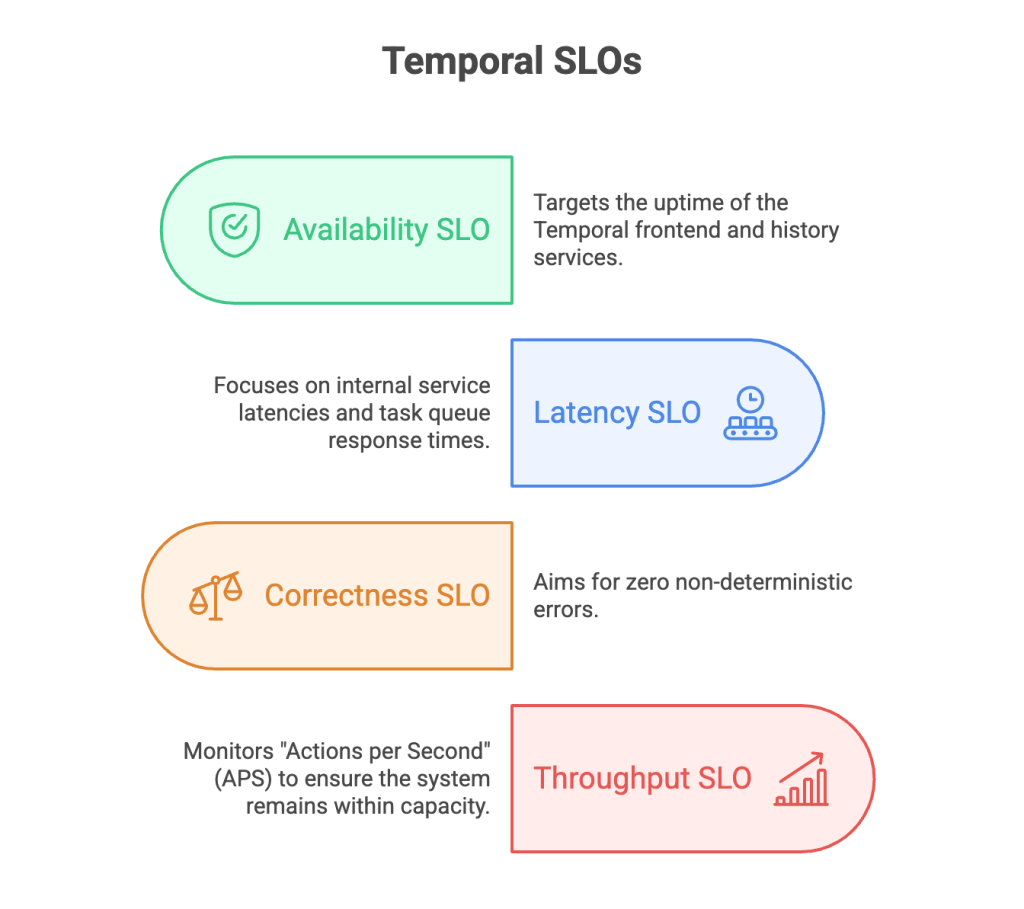
SLOs That Matter: Latency, APS, Success Rates, and Non-Determinism
The most actionable SLI in many Temporal systems is Task Schedule-to-Start latency (time between scheduling a task and a worker picking it up).
- Availability SLO: Targets the uptime of the Temporal frontend and history services (e.g., 99.99% for mission-critical namespaces).
- Latency SLO: Focuses on internal service latencies and task queue response times, ensuring that workers are not starved for work.
- Correctness SLO: Aims for zero non-deterministic errors. Any increase in these errors is a signal of a failed deployment or environmental inconsistency.
- Throughput SLO: Monitors “Actions per Second” (APS) to ensure the system remains within the provisioned capacity limits, especially during peak load events.
Operational Readiness: Error Budgets, Auto-Scaling, and Incident Runbooks
Error budgets operationalize reliability: when burn accelerates, escalation triggers.
In a Temporal context, this might include:
- 1. Worker Auto-Scaling: If the task queue latency increases, the system should automatically scale out the worker fleet to handle the backlog.
- 2. Circuit Breaking: If an activity reaches its maximum retry limit or experiences high failure rates, the system can “trip” a circuit breaker, potentially pausing the workflow and alerting an operator.
- 3. Runbooks: For complex failures like persistent non-determinism or massive task backlogs, engineers should have documented runbooks that describe how to investigate history events, perform manual “Continue-As-New” operations, or roll back worker versions.
Temporal Observability: Metrics, Logs, Traces, and Search at Enterprise Scale
In an enterprise environment, observability is not just about monitoring; it is about the ability to debug complex, distributed state at scale. Because Temporal handles the persistence of state, the telemetry it generates is exceptionally rich, providing a high-fidelity record of every decision made by the system.
Metrics That Matter: Task Queue Latency, Worker Health, and Failure Rates
Temporal observability typically includes:
- Server metrics: persistence latency, matching performance, control-plane health
- SDK metrics: worker polling, task execution, failures, retries, latency distributions
Common worker health signals include:
- frontend request volume (control-plane load)
- poll success rates (workers actually receiving tasks)
- task errors (activity/workflow task failures)
- service latency for key operations (e.g., start/complete responses)
Search Attributes and Correlation IDs: Fast Support, Auditing, and Filtering
Search Attributes are indexed metadata fields that allow operators to filter and find workflows using SQL-like queries. For enterprises, the strategic use of these attributes is essential for customer support and operational auditing.
- Correlation IDs: Every workflow should be tagged with business-relevant IDs like order_id or customer_uuid, allowing support teams to locate a specific execution instantly.
- State Tracking: Custom attributes can track the high-level status of a workflow (e.g., shipment_status = ‘InTransit’), enabling the creation of business dashboards directly from the orchestration layer.
- Filtering: Advanced visibility allows for complex queries, such as “Find all failed workflows for Customer X that started in the last 24 hours”.
| Search Attribute | Type | Example Use Case |
|---|---|---|
| ExecutionStatus | Default | Filtering for Failed or TimedOut executions. |
| WorkflowType | Default | Grouping performance by specific business process. |
| CustomerId | Custom Keyword | Instant lookup for customer-specific support issues. |
| TransactionValue | Custom Double | Analyzing high-value transactions in real-time. |
End-to-End Tracing with OpenTelemetry
Tracing is the ultimate tool for diagnosing performance issues in deep microservices call chains. Temporal’s support for OpenTelemetry allows a single trace ID to be propagated through the entire workflow lifecycle—from the initial starter, through the workflow orchestrator, and into every activity execution. This provides a unified view of the system, revealing exactly how long each activity took and where bottlenecks or network delays are occurring. For enterprises with complex dependency trees, this end-to-end tracing is vital for meeting performance SLAs.
Production readiness checklist for enterprise Temporal workflows
Before scaling Temporal across enterprise workloads, confirm:
- Workflow code is deterministic, versioned, and replay-tested before deployment
- Activities have explicit retry policies, timeouts, and idempotency boundaries
- Task queues and worker pools are separated by workload priority and failure domain
- Search Attributes, metrics, traces, and runbooks give ops a shared view of workflow state
- Disaster recovery targets, failover playbooks, and migration paths are documented and tested
Disaster Recovery for Temporal: Multi-Region Resilience and Failover
For global enterprises, a single-region deployment represents a significant risk. Disaster Recovery (DR) in Temporal is built on the foundation of Multi-Region Namespaces and asynchronous replication.
RPO/RTO targets, drills, and failover playbooks
High-availability approaches replicate data between primary and standby regions.
- RPO (Recovery Point Objective): The target is typically sub-1-minute, meaning in a catastrophic regional failure, the system may lose at most one minute of state transitions that had not yet replicated to the standby region.
- RTO (Recovery Time Objective): The target is 20 minutes for the completion of a failover.
- Failover Drills: Enterprise teams must conduct regular “Game Day” exercises where they manually fail over traffic to the standby region. This validates that the standby workers are correctly configured and have the necessary network permissions to resume the workload.
History Preservation and Conflict Resolution: Designing for Safe Failover
During a failover, the standby cluster becomes active and reconstructs the “Mutable State” of every workflow from the replicated history. However, because replication is asynchronous, a failover can occasionally result in a “divergence” where the new active cluster sees an older version of the history than the primary had before it failed.
Temporal handles this through sophisticated conflict resolution logic, ensuring that the history with the highest version number becomes the source of truth. From an application perspective, this reinforces the need for activity idempotency. If an activity had completed in the primary region but the event hadn’t replicated before failover, the activity will be re-executed in the standby region. Ensuring that all side-effects—like database writes or external API calls—can be safely repeated is the most important architectural requirement for multi-region resilience.
Migrating to Temporal: Cloud vs Self-Hosted Decision Guide
The transition to Temporal often represents a significant architectural shift, whether migrating from a legacy orchestrator or moving from a self-hosted Temporal instance to Temporal Cloud.
Migration Playbook: Dual-Run, Draining, and Cutover to Temporal
Enterprise migrations are rarely a “big bang” event. Instead, they follow a phased playbook designed to ensure zero downtime.
- 1. Preparation:Deploying a “Migration Proxy” that coordinates between the self-hosted server and the target cloud namespace.
- 2. Dual-Run:New workflows are started on the new infrastructure, while existing workflows continue to run on the old system.
- 3. Draining:For short-lived processes, the old system is simply allowed to “drain” until all workflows are complete.
- 4. Handover:Using automated tools (like the S2S proxy), active workflows are replicated to the new environment, allowing for a seamless handover of traffic.
Temporal Cloud vs Self-Hosted: Ops, Upgrades, Cost, and Risk
The decision to self-host or use Temporal Cloud is a strategic trade-off between control and operational efficiency.
| Feature | Temporal Cloud (Managed) | Self-Hosted (OSS) |
|---|---|---|
| Ops Effort | Zero (Managed infrastructure) | High (Database, visibility, and server tuning). |
| Upgrades | Automated and seamless | Manual, high-risk operational task. |
| Availability | 99.9% – 99.99% SLA | Dependent on internal SRE capacity. |
| Cost | Consumption-based (Actions/Storage) | Infrastructure + Engineering head count. |
| Risk | Cell-based isolation, managed DR | Blast radius depends on internal architecture. |
Frequently asked questions about enterprise-grade Temporal workflows
What makes a Temporal workflow enterprise-grade?
An enterprise-grade Temporal workflow is reliable under failure, observable in production, safe to evolve, and scalable across teams and workloads.
It should include deterministic workflow code, idempotent activities, clear retry policies, versioning, Search Attributes, and operational runbooks.
Why is Event History important in Temporal?
Event History is the durable record of workflow decisions, activity results, timers, signals, failures, and state transitions.
Temporal uses it to replay workflows after crashes or restarts, which makes recovery, auditing, and production debugging more reliable.
What should enterprises monitor in Temporal?
Enterprises should monitor workflow failures, task queue latency, activity retries, worker health, history growth, replay errors, and stuck executions.
Search Attributes and business identifiers help support, ops, and engineering teams find the right workflow quickly during incidents.
Should enterprises use Temporal Cloud or self-host Temporal?
Temporal Cloud is usually better when teams want durable execution without operating the Temporal control plane themselves.
Self-hosting can make sense when infrastructure control, custom governance, or internal platform requirements outweigh the operational burden.
Talk to a Temporal Architect: Enterprise Workflow Assessment
Navigating the complexities of durable execution requires an architectural partner who understands both the theory and the operational reality of high-scale orchestration. At Xgrid, our architects specialize in the design, deployment, and optimization of Temporal environments. Whether you are building an AI-driven agentic workflow system, a global financial ledger, or migrating a legacy microservices landscape, our team provides the expert-level guidance needed to ensure your workflows are resilient, observable, and enterprise-grade.
Position your engineering team for success by leveraging Xgrid’s deep expertise in Temporal reference architectures and automated migration strategies. Contact us today for a comprehensive migration assessment or to discuss how we can help you architect the future of your distributed systems.
Download: Temporal Production Deployment Checklist (PDF)
A practical checklist for shipping replay-safe, observable Temporal workflows in production.
Related Temporal enterprise architecture guides
- For go-live architecture checks across retries, timeouts, determinism, payloads, scaling, and observability, read: Temporal Workflow Production Readiness: 6 Architecture Decisions
- For Search Attributes, stuck workflows, replay-safe telemetry, and production dashboards, read: Temporal Observability in Production Guide
- For heartbeats, Continue-As-New, signal handling, and multi-day workflow design, read: Long-Running Temporal Workflows in Production
- For managed vs self-hosted operating-model tradeoffs, read: Temporal Cloud vs Self-Hosted: Which Should You Choose?
Related Articles
Related Articles

Established in 2012, Xgrid has a history of delivering a wide range of intelligent and secure cloud infrastructure, user interface and user experience solutions. Our strength lies in our team and its ability to deliver end-to-end solutions using cutting edge technologies.
NAVIGATE
Cloud & DevOps Web & Mobile Apps Temporal Digital Marketing GTM Engineering Marketo Consulting HubSpot Consulting Company Careers ResourcesOFFICE ADDRESS
US Address:
Plug and Play Tech Center, 440 N Wolfe Rd, Sunnyvale, CA 94085
Dubai Address:
Dubai Silicon Oasis, DDP, Building A1, Dubai, United Arab Emirates
Pakistan Address:
Xgrid Solutions (Private) Limited, Bldg 96, GCC-11, Civic Center, Gulberg Greens, Islamabad
Xgrid Solutions (Pvt) Ltd, Daftarkhwan (One), Building #254/1, Sector G, Phase 5, DHA, Lahore
Xgrid © 2026. All rights reserved.