
Why Most Workflow Systems Work in Staging but Fail in Production


Six failure modes that staging environments structurally cannot reveal — and what to do about each before your first production incident
|
TL;DR Staging environments test whether your workflows run. They do not test whether your workflows are production-safe. The failure modes that surface in production — non-determinism under real replay conditions, retry storms at scale, worker starvation under real concurrency, long-running timer drift, signal race conditions, and silent failures with no observability — require production-like conditions to trigger. Each one has a specific cause, a specific staging blind spot, and a specific fix. This post covers all six. |
Why Staging Gives False Confidence
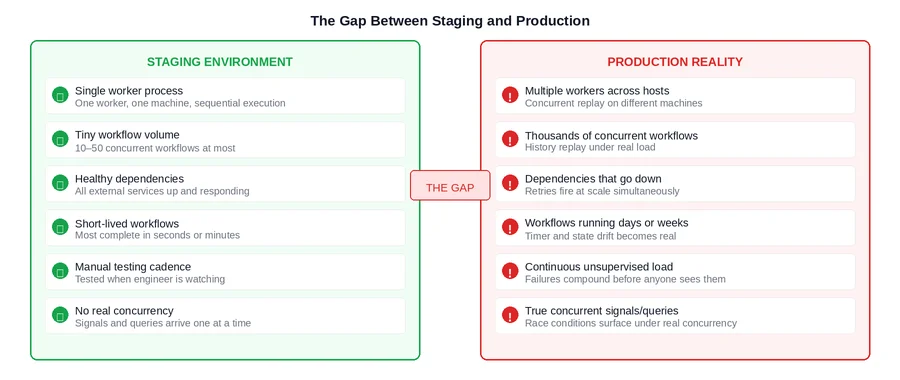
A Temporal workflow that passes staging is a workflow that executes correctly when everything goes right, at low volume, with healthy dependencies, and with an engineer watching. That is not a small achievement, but it is also not what production looks like.
Production is characterized by things staging structurally cannot simulate: workers that crash and restart after running for days rather than minutes, thousands of concurrent workflows generating retry storms when a dependency goes down, task queues that back up under real traffic load, signals arriving concurrently faster than workflow tasks can process them, and failures that compound for hours before anyone notices.
The result is a class of bugs that are genuinely invisible in staging — not because the team missed them, but because the conditions required to trigger them do not exist in a staging environment by design. Understanding these failure modes before go-live is what separates a smooth production launch from one that produces incidents in the first week.
|
The Core Issue Staging validates correctness under ideal conditions. Production tests durability under adversarial ones. These are different properties, and a system can have the first without the second. Temporal’s durability guarantees protect you from infrastructure failures. They do not protect you from application-layer design decisions that only fail under production conditions. |
Failure Mode 1: Non-Determinism
Temporal’s durability model works by replaying your workflow function against the recorded event history to reconstruct state after a worker crash. For this to work correctly, the workflow function must be deterministic: given the same event history, it must always produce the same sequence of commands.
Non-determinism violations — using time.Now() instead of workflow.Now(ctx), using random values without routing them through activities, making direct network calls inside workflow code — are present from the first line of code that introduces them. But they do not surface until replay happens under conditions where the non-deterministic value differs from its original execution.
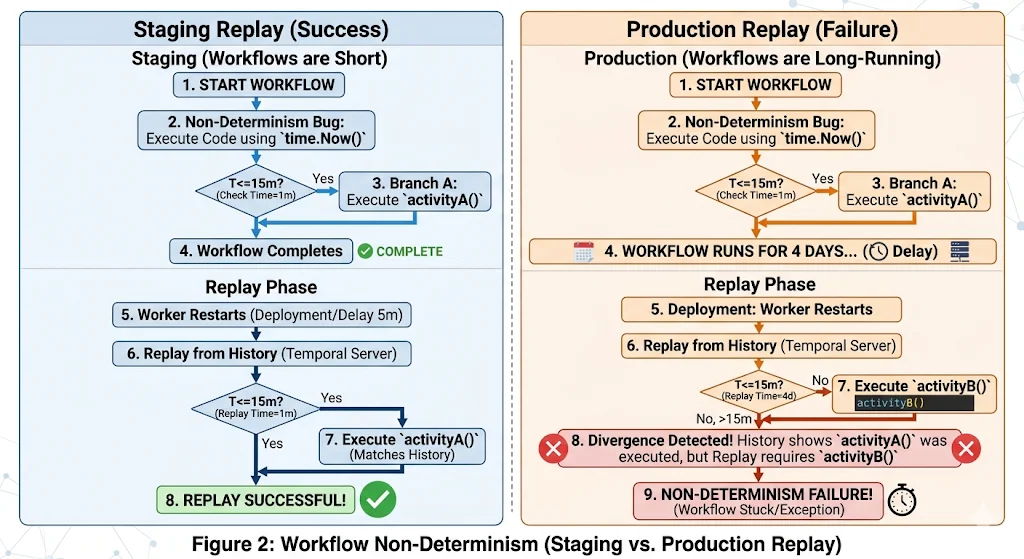 In staging, workers restart infrequently and workflows complete in minutes. The window between original execution and replay is so small that even time.Now() returns nearly identical values. The non-determinism bug is present but the conditions to trigger it are not.
In production, a worker running a payment approval workflow that has been open for four days restarts due to a deployment. Temporal replays the workflow from the beginning. time.Now() now returns a value four days later than the original execution. The workflow function branches differently. The event history shows Activity A was scheduled; the replay tries to schedule Activity B instead. Temporal detects the mismatch and the workflow is stuck in a non-determinism error state permanently.
|
How to Catch This Before Production Write an integration test that deliberately restarts the worker mid-workflow and verifies the workflow resumes and completes correctly. Run the Temporal workflow replayer tool against your workflow histories in staging after every code change. Audit every workflow file for time.Now(), rand, and direct I/O — these are non-negotiable red flags. |
Failure Mode 2: Retry Storms
Every activity in Temporal has a retry policy. If no explicit policy is set, Temporal applies its default: unlimited retries, starting at a one-second interval with a 2x backoff coefficient capped at 100 seconds. In staging, with a handful of concurrent workflows, this policy is invisible. An activity fails, retries a few times, and either succeeds or fails cleanly.
In production, when a downstream dependency goes down and thousands of workflows are simultaneously waiting on activities against that dependency, every one of those workflows begins retrying according to the same policy. Within minutes, the task queue is receiving tens of thousands of retry attempts. The Temporal billing meter is running at multiples of its normal rate. When the dependency recovers, it is immediately hit by a wall of simultaneous requests from every workflow that was waiting — which can crash it again.
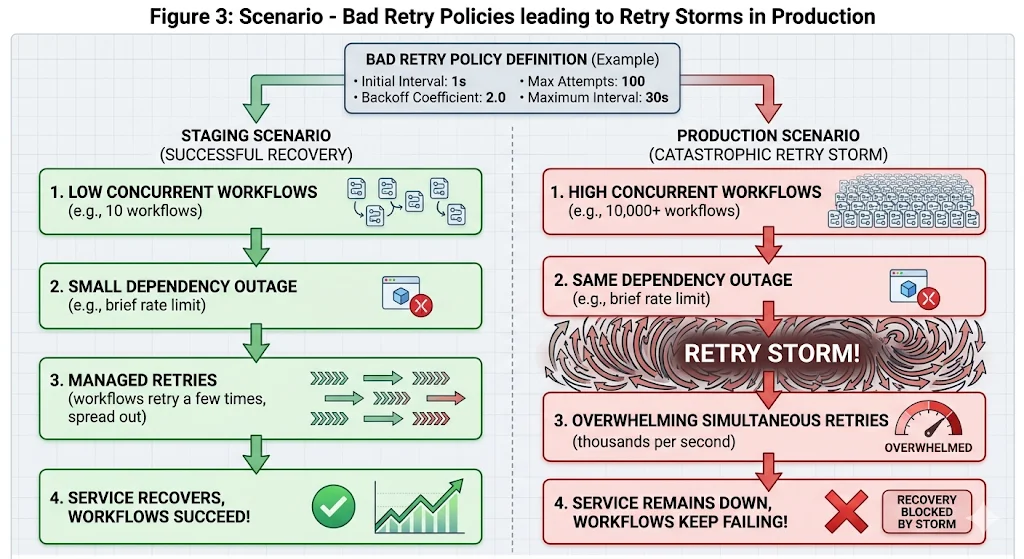
The fix has two parts. First, set explicit retry policies on every activity with a higher backoff coefficient (3 or 4 instead of 2) and a hard MaxAttempts cap. This reduces the number of retry attempts per unit time during an outage, which both reduces cost and gives the recovering dependency breathing room. Second, enumerate NonRetryableErrorTypes explicitly so that business validation errors — which will never succeed on retry — fail immediately rather than burning retry budget.
|
How to Catch This Before Production Load test your workflows with a simulated dependency outage. Take down the dependency, start your normal workflow volume, observe the action count and task queue depth over 30 minutes. If the numbers look alarming at your staging volume, they will be far worse at production volume. Fix the retry policies before go-live, not after the first billing spike. |
Failure Mode 3: Worker Starvation
Temporal workers have a configurable limit on the number of concurrent workflow tasks and activity tasks they can execute simultaneously. In staging, this limit is never the constraint — the number of concurrent workflows in a staging environment is small enough that workers always have available capacity. The limit is set, never tested, and forgotten.
In production, real traffic fills the task queue. If the combined capacity of all worker instances is lower than the peak concurrent workflow task demand, tasks sit in the queue. Temporal’s ScheduleToStartTimeout begins firing for tasks that wait too long for a worker to pick them up. Workflows start failing not because their activities failed, but because the activities never started.
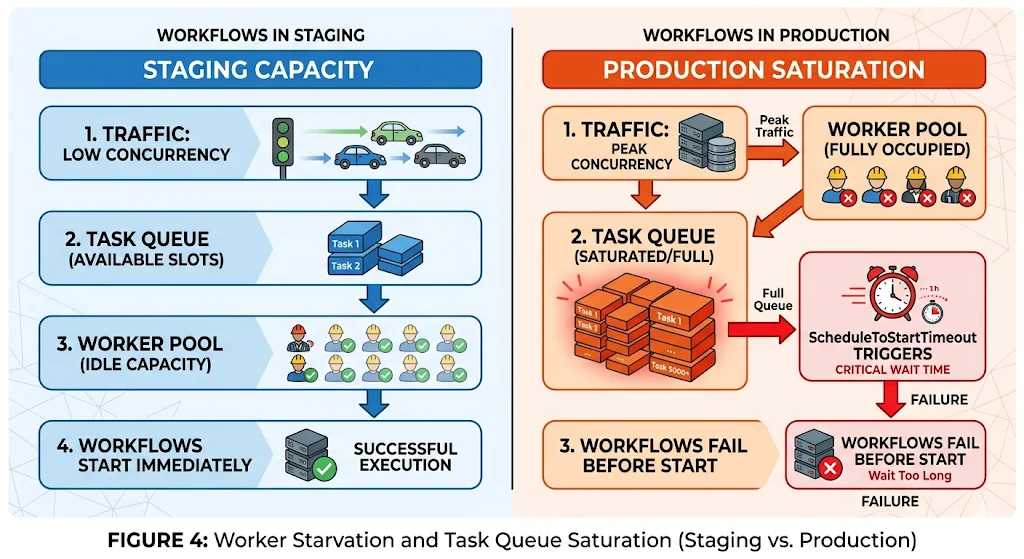
This failure mode is particularly insidious because the workflows fail cleanly — they hit a timeout and produce a proper failure event — but the root cause is invisible unless you are watching the schedule_to_start latency metric. Support sees failed workflows. Engineering sees timeout errors. Nobody immediately connects it to worker pool sizing.
|
How to Catch This Before Production Load test at 2x your expected peak concurrent workflow volume before go-live. Monitor temporal_activity_schedule_to_start_latency during the test. If P99 is climbing, your worker pool is undersized for the load. Size the pool to handle the peak, not the average. |
Failure Mode 4: Long-Running Workflow Drift
Workflows that complete in seconds or minutes in staging are tested end-to-end easily. Workflows designed to run for hours, days, or weeks cannot be fully tested in staging without artificial time compression — and artificial time compression does not replicate the real conditions those workflows encounter.
The two specific issues that only surface in genuinely long-running workflows in production:
- Heartbeat timeout gaps: an activity running for a long time without calling activity.RecordHeartbeat() will not be detected as crashed until its StartToCloseTimeout expires — which could be hours if misconfigured. The workflow appears stuck. The activity is actually dead. Staging never runs the activity long enough for this gap to matter.
- Signal delivery after worker restart: a workflow waiting for a signal over multiple days will experience at least one worker restart in that window. If the signal handler has a subtle non-determinism issue, it only manifests after that restart. Staging tests signal delivery, but not signal delivery after a multi-day gap and a worker restart.
The fix for heartbeating is explicit: any activity expected to run longer than 10 seconds should call RecordHeartbeat() on a regular interval, and HeartbeatTimeout should be set to a value that reflects that interval plus a reasonable margin. The fix for signal delivery is the same as for non-determinism generally: write workflow replay tests that include signals, and run them after every code change.
Failure Mode 5: Signal and Query Race Conditions
In staging, signals and queries arrive one at a time, sent manually by an engineer running a test. The workflow processes each signal before the next one arrives. State transitions are clean and sequential.
In production, multiple signals can arrive within milliseconds of each other from different services or event sources. The workflow’s event loop processes one workflow task at a time, which means signals that arrive between workflow tasks are buffered and processed in the next task. If the workflow’s signal handler logic assumes that only one signal is pending at a time, or if it reads state that was modified by a concurrent signal, the resulting state can be incorrect in ways that are not immediately visible.
The most common manifestation: a workflow that handles both an advance signal and a cancel signal correctly in isolation handles them incorrectly when both arrive within the same workflow task window. The cancel signal is processed first, the workflow transitions to a terminal state, and the advance signal is then processed against a workflow that is already closed — or vice versa, depending on the order the signals are buffered.
|
How to Catch This Before Production Write integration tests that send multiple signals in rapid succession and verify the resulting workflow state is consistent. Test every combination of concurrent signals that is plausible in production. The scenarios that feel unlikely in staging are the ones that happen continuously at production volume. |
Failure Mode 6: Visibility Gaps
In staging, an engineer is watching. When a workflow fails, someone sees it within minutes. The failure is investigated, the root cause is identified, and the fix is deployed. The feedback loop is tight because the observer is always present.
In production, nobody is watching individual workflows. Failures accumulate. A workflow type with a 10% structural failure rate running at 5,000 executions per day produces 500 failed workflows before the end of the first business day. If there is no alert on the temporal_workflow_failed metric segmented by workflow type, and if the support team is not looking at the Temporal UI, those failures are invisible until a customer escalates or a downstream system shows a discrepancy.
Visibility gaps are not a Temporal problem. They are an instrumentation decision that teams defer because staging never makes the cost of deferring it visible. In staging, the engineer is the monitoring system. In production, the monitoring system has to replace the engineer.
|
How to Catch This Before Production Require workflow-level alerting as a go-live criterion, not a post-launch task. Before any new workflow type goes to production: set an alert on temporal_workflow_failed for that workflow type, write a runbook covering the top three failure modes and their remediation steps, and confirm that the on-call rotation knows which team owns incidents for that workflow type. |
All Six Together: The Pattern
Seen individually, each failure mode looks like a specific technical oversight. Seen together, they share a common structure: they are all properties of a system under production conditions that staging conditions structurally prevent from being observed.
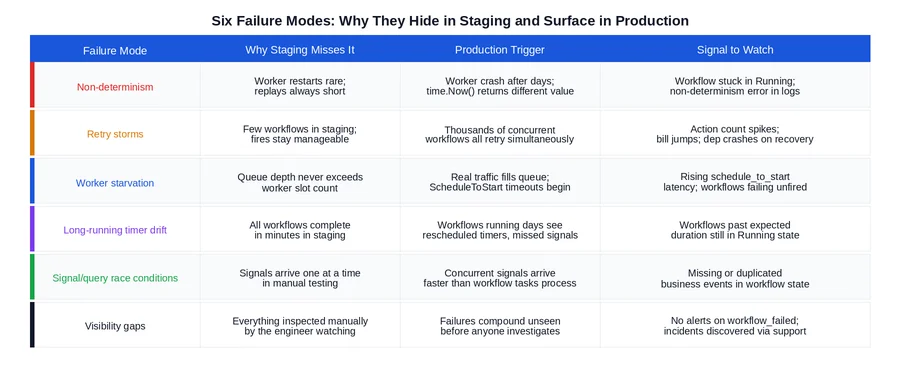
The common thread across all six: staging validates that the workflow runs. It does not validate that the workflow is durable, scalable, or observable. Those three properties require different tests, run under different conditions, against different metrics. None of them are difficult to verify. All of them require deliberately creating conditions that a standard staging environment does not create by default.
What to Do Before Go-Live
The diagram below summarizes the minimum verification steps for each failure mode that staging cannot cover on its own. These are not comprehensive — they are the minimum required to avoid the first week of production incidents that most teams experience.
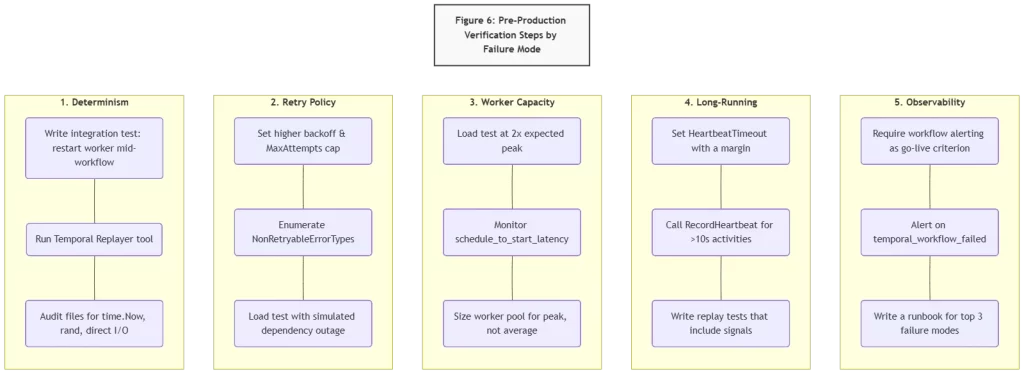
Two of these deserve emphasis because they are most commonly skipped:
- Load testing with dependency failures, not just load testing with healthy dependencies. A load test that passes with all dependencies up tells you your worker capacity is right-sized. It does not tell you what your retry policy does when a dependency goes down at that load level. These are different tests.
- Workflow-level alerting before launch, not after the first incident. The instinct is to launch and add alerting iteratively. The failure mode this creates is discovering that a workflow type has a 30% failure rate three days after launch through a customer support escalation rather than through a monitoring alert that fires on day one.
Closing Thoughts
The gap between staging and production is not a testing failure. It is a structural property of how staging environments are built and used. Staging is optimized for fast feedback on correctness. Production reveals durability, scalability, and observability — properties that require different conditions, different load levels, and different monitoring to surface.
Temporal’s durability guarantees cover a lot of ground: worker crashes, network partitions, infrastructure failures. They do not cover application-layer design decisions that only fail at scale. Those are the six failure modes in this post, and all six are fixable before go-live if the right tests are run and the right questions are asked before the production cutover date is set.
The teams that avoid first-week production incidents are not the ones that wrote better workflow code in staging. They are the ones that ran the production-readiness verification steps that staging structurally cannot run for them.
Is your team still the bottleneck for production readiness confidence?
If the answer to “is this workflow production-safe?” still requires an engineer to think through each failure mode manually before every launch — that’s a design review gap that compounds with every new workflow type.
Xgrid offers two entry points depending on where you are:
- Temporal Launch Readiness Review — we review your workflow designs against the six failure modes above, identify gaps in retry policy, determinism, worker sizing, and observability, and deliver a concrete go / no-go scorecard before you launch.
- Temporal Reliability Partner — for teams that want a named Temporal expert embedded long-term to run design reviews before new workflows go live and catch production-readiness gaps before they become incidents.
Both are fixed-scope. No open-ended retainer required to get started.
Related Articles
Related Articles

Established in 2012, Xgrid has a history of delivering a wide range of intelligent and secure cloud infrastructure, user interface and user experience solutions. Our strength lies in our team and its ability to deliver end-to-end solutions using cutting edge technologies.
NAVIGATE
Cloud & DevOps Web & Mobile Apps Temporal Digital Marketing GTM Engineering Marketo Consulting HubSpot Consulting Company Careers ResourcesOFFICE ADDRESS
US Address:
Plug and Play Tech Center, 440 N Wolfe Rd, Sunnyvale, CA 94085
Dubai Address:
Dubai Silicon Oasis, DDP, Building A1, Dubai, United Arab Emirates
Pakistan Address:
Xgrid Solutions (Private) Limited, Bldg 96, GCC-11, Civic Center, Gulberg Greens, Islamabad
Xgrid Solutions (Pvt) Ltd, Daftarkhwan (One), Building #254/1, Sector G, Phase 5, DHA, Lahore
Xgrid © 2026. All rights reserved.