
Workflow Observability: Turning Field Operations into a Real-Time Control Tower


Most field operations teams do not lack effort. They lack visibility.
Workers are active across job sites. Supervisors are making decisions. Tools are moving. Safety steps are being completed. Tasks are progressing or getting blocked. But leadership often sees only fragments of this activity through end-of-day reports, phone calls, spreadsheets, or delayed app syncs.
That creates a dangerous lag between reality and management action. A crew may be waiting on materials for hours before anyone outside the site knows. A payroll issue may not appear until days later. A safety record may be incomplete until an audit. A project bottleneck may remain hidden until the schedule has already slipped.
This is why workflow observability matters. It turns operational activity into a live, structured event stream. Instead of asking, “What happened yesterday?” leaders can ask, “What is happening right now, and what needs attention?”
Temporal-powered workflows are especially useful here because every workflow contains a history of events. When field operations are modeled as durable workflows, those histories become more than technical logs. They become operational intelligence.
The Pain Point: Field Leaders Are Often Flying Blind
In traditional field systems, visibility is limited for several reasons.
Data may be delayed because mobile devices are offline. Events may be scattered across multiple systems: payroll, safety, project management, asset tracking, and messaging apps. Managers may rely on manual updates from supervisors, which are often incomplete or late. Engineers may need to search logs to understand system failures, while operations leaders need business-level answers.
This creates two visibility gaps.
- The first is the business gap. Leaders cannot clearly see who is active, what tasks are progressing, where blockers exist, and whether compliance steps are complete.
- The second is the technical gap. Engineering teams may not know why a workflow failed, whether an API dependency is slow, or whether events are stuck because of connectivity, downstream systems, or worker capacity.
Workflow observability closes both gaps by making events traceable from the field to the backend and into business dashboards.
What Workflow Observability Means in Field Operations
Workflow observability is the ability to understand the state, progress, and history of business workflows as they run.
In field operations, that means seeing events such as:
Worker checked in
Beacon detected
Safety briefing completed
Task started
Task paused
Break started
Break ended
Blocked by missing materials
Tool checked out
Tool returned
Task completed
Worker checked out
Payroll event submitted
Third-party API failed or retried
When these events are part of a durable workflow history, they become reliable evidence of what happened. Managers can view current status. Auditors can review past activity. Engineers can troubleshoot failures. Analysts can study trends over time.
The workflow history becomes a shared source of truth across operations, compliance, engineering, and leadership.
From Static Reports to Real-Time Operations Dashboards
A major benefit of workflow observability is the ability to build a real-time operations dashboard.
Instead of waiting for supervisors to report status, the dashboard can reflect workflow events as they occur. If a worker checks in, the active site count updates. If a task starts, throughput metrics update. If a technician sends a blocker signal, the dashboard highlights it for action.
This creates a control tower for field operations.
Executives can see which sites are busiest. Project managers can compare tasks in progress against completed work. Supervisors can respond to blockers before they cascade into schedule delays. Compliance teams can see whether required steps have been completed.
The important shift is that the dashboard is not built on guesses or delayed summaries. It is built on the same event history that drives the workflow.
Workflow History as an Audit Asset
Many organizations think of logs as technical artifacts. In workflow-based field operations, event histories become business assets.
Every workflow can show what happened, when it happened, and how the system responded. For audits, this is far stronger than reconstructing events from paper, screenshots, emails, or partial database records.
A workflow history can support questions like:
- Was the worker checked in before the task started?
- Was the required safety step completed?
- Were tools returned before checkout?
- Did the workflow retry a failed payroll submission?
- When did connectivity drop and when were events synced?
- Which events arrived late but were still processed?
This level of detail helps reduce audit preparation time and improves confidence in the record. It also creates accountability because the organization can see the full process, not just the final outcome.
Real-Time Blocker Alerts: The Difference Between Reactive and Proactive Management
One of the most valuable uses of workflow observability is blocker detection.
In many field organizations, blockers are discovered too late. A worker waits for materials, equipment, access, instructions, or another trade. The delay may be mentioned verbally, noted in a message, or buried in a daily report. By the time leadership sees it, the lost time cannot be recovered.
In a workflow-driven system, a blocker can be sent as a specific event. For example, a technician marks “Waiting on materials.” The workflow records it immediately, and the dashboard flags it for operations.
That changes the management model. Instead of reacting at the end of the day, supervisors can intervene during the day. They can dispatch materials, reassign workers, escalate access issues, or adjust schedules before idle time spreads.
The value of workflow observability is not just better reporting. It is faster action.
OpenTelemetry and End-to-End Workflow Tracing
Workflow observability should cover both business events and technical execution. That is where OpenTelemetry can add value.
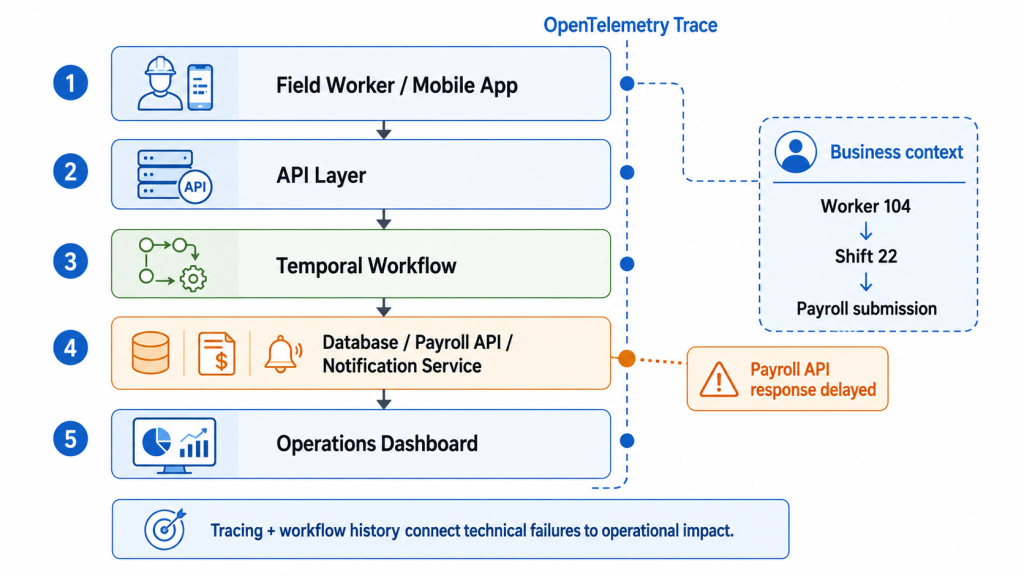
A field action may pass through multiple systems before completion. A worker taps a mobile app. The request moves through an API layer. It enters a workflow. The workflow may call a database, payroll system, notification service, or third-party platform. If something fails, teams need to know where and why.
OpenTelemetry tracing can help connect these steps. Engineering teams can follow a request from the device through backend services and external APIs. If payroll submission is slow, the trace can reveal whether the bottleneck is the workflow, the network, or the payroll provider.
When OpenTelemetry traces are combined with Temporal workflow histories, organizations get both technical and business context. They can see not only that an activity failed, but which worker, shift, task, or business process was affected.
| For teams building this kind of visibility into production Temporal systems, observability should not be treated as an afterthought. It needs to be designed into the workflow architecture from the beginning.
Xgrid’s Temporal Production Deployment Checklist can help teams validate those controls before launch, especially around workflow histories, retries, observability, versioning, and production readiness. |
Scaling Workflow Observability Without Overloading Systems
Real-time visibility becomes difficult when thousands of workers generate events at the same time. Morning check-ins, shift changes, weather delays, and bulk task updates can create sudden spikes.
A traditional push-based web architecture may struggle when many requests hit the backend simultaneously. Infrastructure teams may respond with aggressive autoscaling, queues, and complex retry systems.
Temporal’s worker polling model offers a more stable approach. Tasks are pulled by worker processes when they have capacity. This creates natural backpressure. Events can be persisted and queued without forcing every downstream service to process everything instantly.
For field operations, this means the system can absorb spikes without losing events. A burst of check-ins may take a short time to fully process, but the events are preserved. The platform remains stable instead of collapsing under load.
This matters for workflow observability because dashboards are only useful if the underlying event stream is reliable. A control tower cannot be trusted if high-volume moments cause data loss.
Security and Zero-Trust Workflow Orchestration
Field operations often involve sensitive information: worker identities, site locations, payroll details, client facilities, and project data. Many organizations want the benefits of managed orchestration without exposing sensitive data unnecessarily.
A hybrid architecture can help. In this model, Temporal Cloud can handle orchestration while sensitive business payloads are encrypted before leaving the organization’s controlled environment. A custom data converter can encrypt workflow payloads so the orchestration layer stores and routes encrypted data rather than readable business information.
This allows the cloud service to act as a scheduling and reliability layer while the organization retains control of sensitive data and encryption keys.
For regulated or security-conscious industries, this pattern is important. It shows that workflow observability and durable orchestration do not have to come at the expense of data governance.
Turning Workflow Data into Long-Term Operational Intelligence
Real-time dashboards are only the beginning. Workflow histories also support long-term analysis.
Over weeks and months, organizations can study patterns such as:
Which crews complete similar tasks faster?
Which sites experience the most blockers?
How much time is lost to weather?
Which tasks frequently require rework?
Which external systems cause delays?
Where do payroll corrections happen most often?
Which safety steps create friction?
This turns workflow data into a continuous improvement engine. Operations teams can refine staffing, improve estimates, redesign training, identify process bottlenecks, and make better bids.
Because the data comes from actual workflow histories, it is grounded in real operational behavior rather than anecdotal reporting.
Conclusion: Workflow Observability Makes Field Operations Manageable
Field operations are complex because they combine human work, physical environments, mobile devices, connectivity gaps, compliance requirements, and multiple backend systems.
Without workflow observability, leaders are forced to manage this complexity through delayed reports and incomplete records. With workflow observability, they can see work as it happens, understand why issues occur, and act before problems grow.
Temporal-powered workflows make this possible by turning field activity into durable event histories. Those histories support dashboards, audits, blocker alerts, traces, analytics, and long-term process improvement.
For teams moving from workflow design to production implementation, Xgrid helps connect these pieces into reliable Temporal architectures that make operational visibility useful across engineering, compliance, and field operations.
For organizations running high-stakes field operations, workflow observability is not just a technical capability. It is how the business moves from guesswork to control.
FAQ: Workflow Observability
What is workflow observability?
Workflow observability is the ability to monitor, inspect, trace, and understand business workflows as they execute. It shows what happened, what is happening now, and where issues are occurring.
How is workflow observability different from application logging?
Application logs usually show technical events from systems or services. Workflow observability connects technical events to business processes, such as a worker shift, task, safety step, or payroll submission.
Why does workflow history matter for field operations?
Workflow history provides a durable timeline of field events. This can support real-time dashboards, compliance audits, payroll verification, troubleshooting, and operational analytics.
How does OpenTelemetry improve workflow observability?
OpenTelemetry can trace requests across systems. When combined with workflow history, it helps teams understand both the technical path and the business impact of a field event or failure.
Can workflow observability help with audits?
Yes. A durable workflow history can show when events occurred, which steps were completed, and how the system handled retries, failures, or delayed events. This creates stronger audit evidence than fragmented manual records.
Related Articles
Related Articles

Established in 2012, Xgrid has a history of delivering a wide range of intelligent and secure cloud infrastructure, user interface and user experience solutions. Our strength lies in our team and its ability to deliver end-to-end solutions using cutting edge technologies.
NAVIGATE
Cloud & DevOps Web & Mobile Apps Temporal Digital Marketing GTM Engineering Marketo Consulting HubSpot Consulting Company Careers ResourcesOFFICE ADDRESS
US Address:
Plug and Play Tech Center, 440 N Wolfe Rd, Sunnyvale, CA 94085
Dubai Address:
Dubai Silicon Oasis, DDP, Building A1, Dubai, United Arab Emirates
Pakistan Address:
Xgrid Solutions (Private) Limited, Bldg 96, GCC-11, Civic Center, Gulberg Greens, Islamabad
Xgrid Solutions (Pvt) Ltd, Daftarkhwan (One), Building #254/1, Sector G, Phase 5, DHA, Lahore
Xgrid © 2026. All rights reserved.