
What is Temporal External Storage and How It Solves Large Payload Limits


| Temporal External Storage is a mechanism that offloads massive data files to an external store, such as Amazon S3. It solves the Temporal Service per-payload size limit by replacing the large data with a lightweight reference token in the Event History. One concrete detail is that developers can set a custom size threshold, which defaults to 256 KiB, to trigger this offloading automatically. |
Building resilient applications often means passing data between services. However, orchestration systems are not designed to serve as databases for massive files. When an AI agent generates a massive conversation log, or a document processing pipeline handles high-resolution images, moving that data directly through an orchestration engine creates severe performance bottlenecks.
Learn how Xgrid helps teams design production-ready Temporal architectures →
Why Temporal Workflows Fail Silently with Large Payloads
Temporal workflows fail silently with large payloads when a single message crosses the 2 MB hard limit enforced by Temporal Cloud, leaving the workflow in an orphaned state.
Think of a Temporal workflow as a highly organized courier carrying messages between different parts of an application. The courier is incredibly fast but has a strict weight limit on their backpack. If a worker tries to hand the courier a massive document, the courier cannot carry it.
Without a built-in solution, developers must manually slice the data into smaller pieces or store it in a separate database and pass the ID around. Temporal large payload storage automates this process entirely. It is particularly useful for:
- Data Processing Pipelines: Processing high-resolution images, documents, or large CSV files directly.
- AI Agent Workflows: Storing massive, accumulating LLM conversation histories that grow with every single prompt. See how we orchestrate multi-agent systems with Temporal →
- Temporal Cloud Migration: Moving from a self-hosted environment with custom infrastructure limits to Temporal Cloud without rewriting existing workflow code that exceeds the 2 MB limit. We’ve helped teams migrate to Temporal Cloud — read the USIS case study →
How Does Temporal External Storage Work?
The Temporal Data Conversion pipeline is the SDK process that serializes and deserializes application data. It manages external uploads by intercepting payloads at the very end of this pipeline and inserting a small reference claim into the workflow history. The Temporal SDK parallelizes these external uploads and downloads to minimize latency during task execution.
The process is entirely transparent to the developer writing the workflow code. When you configure the Temporal SDK to use this feature, you define a size threshold.
- Uploading: When a workflow generates a result larger than the threshold, the SDK pauses, uploads the data to an external store (like Amazon S3), and saves a tiny “receipt” in the Temporal workflow history.
- Downloading: When the next step in the workflow needs that data, the Temporal worker sees the receipt, fetches the heavy data from the external store in parallel, and hands the reconstructed data back to the application code.
Because this happens after the Payload Codec step in Temporal’s architecture, any encryption you apply happens before the data is uploaded to your external store. Your data remains completely secure in transit and at rest.
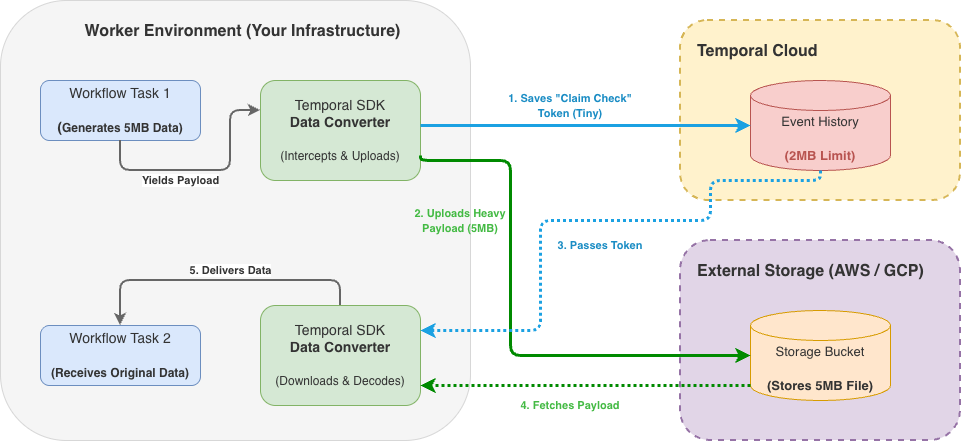
The Claim Check Pattern: Managing Spiky Data Sizes
The claim check pattern is an architectural design where a system passes a small token instead of a full data payload. It handles spiky data sizes in Temporal by dynamically offloading only the data that exceeds a predefined size threshold. A single workflow task can safely process multiple oversized payloads concurrently using this automated routing.
The claim check pattern works exactly like checking a coat at a restaurant. You do not carry a heavy winter coat to your table; you hand it to the attendant and keep a small ticket in your pocket. When you need the coat, you trade the ticket back.
In Temporal at scale, a system might usually process 10 KB text strings but occasionally receive a 5 MB file. Instead of building custom code to handle the exception, the storage driver automatically makes the decision. Small payloads pass through the standard Temporal workflow history instantly, while the large payload gets “checked” into the external store.
Real-World Architecture: Fixing Runaway Costs in Document Pipelines
As we frequently highlight in our engineering breakdowns on cloud optimization, passing full data objects directly through Temporal workflow history is an architectural anti-pattern. Workflows are designed to be state coordinators, not data carriers.
Consider a standard Accounts Payable Workflow Automation pipeline. The workflow coordinates ingesting high-resolution PDFs, running OCR data extraction, routing to exception queues, and syncing with an ERP. A typical OCR payload or audit log can easily reach 1.5 MB to 3 MB.
Without External Storage, routing this data directly through the Temporal SDK creates severe technical and financial bottlenecks:
- The Technical Limit: Any payload crossing the 2 MB threshold immediately crashes the execution with a PayloadSizeExceededFailure, leaving the invoice in an orphaned state.
- The Financial Bloat: Temporal Cloud billing is heavily influenced by Event History size and storage retention. If a workflow executes 40 state transitions carrying a 1.5 MB payload, a single execution bloats to over 60 MB of history. At a volume of 100,000 invoices per month, you are paying premium database rates for Terabytes of orchestration storage, alongside severely degraded worker replay latency.
The Implementation and ROI By implementing the Temporal External Storage driver, we fundamentally change the cost structure and reliability of the pipeline. We typically set the DataConverter threshold to 256 KiB.
When the OCR worker returns a 3 MB result, the SDK automatically diverts the payload to an AWS S3 bucket and returns a lightweight, 50-byte Claim Check token back to the Temporal Service.
- Cost Optimization: Orchestration storage bloat drops by over 99%. The heavy data is shifted to cheap, cold cloud storage (like S3 Standard, costing pennies per GB), drastically reducing the Temporal Cloud monthly bill.
- Performance: Workflow replay latency drops from seconds to milliseconds because the workers no longer have to deserialize massive JSON blocks just to check state.
- Compliance: Because the External Storage driver executes after the Payload Codec in the Temporal pipeline, the 3 MB payload is fully encrypted (e.g., AES-256 for HIPAA or PCI compliance) before it leaves the worker and hits S3. The data remains secure at rest, and the orchestration engine stays lean, fast, and highly cost-effective.
How to Troubleshoot Temporal Large Payload Errors
Large payload issues are one of the top causes of Temporal workflow failure debugging in production deployments. When workflows fail silently due to exceeding the 2 MB limit, they often leave orphaned state that requires manual intervention.
| Symptom | Cause | Fix | Verification |
|---|---|---|---|
| Workflow execution fails with payload size error | The payload exceeds the 2 MB hard limit enforced by Temporal Cloud. | Implement a Temporal External Storage driver to route large data to AWS S3. | The Temporal UI displays a reference token instead of the full payload data. |
| Workflow task latency degrades significantly | Temporal workflow history is bloating due to accumulating medium-sized payloads. | Lower the size threshold on the storage driver to offload more payloads. | Task execution latency drops and Event History size stabilizes. |
| Worker fails to decode payload | The payload was uploaded unencrypted because the external storage driver ran before the Codec. | Order the Data Converter pipeline so the Payload Codec runs before External Storage. | Data downloaded from the external blob store is encrypted at rest. |
| Payload not found during a replay | The cloud provider deleted the external payload before the workflow finished running. | Increase the Time-to-Live (TTL) on the external storage bucket. | Workflows successfully complete their entire lifecycle, including required replays. |
Example: Implementing External Storage in Go
When resolving these payload limit failures, setting up the SDK correctly is vital. Here is how you configure the Data Converter to handle the external uploads:
import (
"go.temporal.io/sdk/client"
"go.temporal.io/sdk/converter"
)

// Configure External Storage with S3
dataConverter := converter.NewCodecDataConverter(
converter.GetDefaultDataConverter(),
NewS3PayloadCodec(
s3Client,
"my-temporal-payloads-bucket",
256*1024, // 256 KiB threshold
),
)

c, err := client.Dial(client.Options{
DataConverter: dataConverter,
})
Common Mistakes When Configuring External Storage
External storage lifecycle management is the process of governing how long offloaded payloads exist in your cloud bucket. It prevents storage cost bloat and broken workflow replays by dictating exactly when a file is safe to delete. A correct Time-to-Live (TTL) rule must outlive the maximum workflow run timeout.
- Mistake 1: Setting the storage TTL too short. If your cloud bucket deletes a file while a workflow is still running, the workflow will permanently fail when it tries to replay.
- Fix: Set the external store TTL to be greater than the Maximum Workflow Run Timeout plus the Namespace Retention Period.
- Mistake 2: Assuming Temporal cleans up orphaned data.
- Fix: Configure a cloud provider rule (such as AWS S3 Lifecycle Configuration) to automatically delete objects after the TTL. Temporal does not delete payloads from your external store automatically.
- Mistake 3: Infinite running workflows with external payloads. If a workflow has no Run Timeout, there is no finite TTL that guarantees safety for external payloads.
- Fix: Use the Continue-as-New feature for perpetual workflows. This starts a fresh workflow execution, allowing the older external payloads to safely expire after their retention period ends.
Frequently Asked Questions
Why do Temporal workflows get stuck with large payloads? Temporal workflows can get stuck when a payload exceeds the 2 MB limit but the error is not properly handled. The workflow execution pauses indefinitely waiting for data that never arrives, requiring manual termination and replay.
Does Temporal delete external payloads? No, Temporal does not automatically delete payloads from your external store. Engineers must configure an S3 bucket lifecycle policy or equivalent cloud provider rule to delete old files based on a TTL.
How do I handle large payloads in Temporal Cloud? Because Temporal Cloud enforces a hard 2 MB limit on payloads, you must configure Temporal External Storage on your Data Converter to offload larger files transparently.
Is external payload data encrypted? Yes, if configured correctly. External Storage runs after the Payload Codec in the pipeline. If you implement an encryption codec, the payload is fully encrypted before it is ever uploaded to your external store.
Why use the claim check pattern in Temporal? The claim check pattern prevents large inputs from bloating the Event History. Keeping the Event History small reduces workflow task latency and prevents Temporal observability degradation.
Can I use my own custom storage backend? Yes. While Temporal provides built-in drivers for systems like Amazon S3, engineers can implement a custom storage driver interface to route payloads to any internal storage service. For more details, consult the official Temporal docs on External Storage.
The Bottom Line: Keep Your Orchestration Lean
Ultimately, treating an orchestration engine like a database is a fast track to degraded performance and spiraling cloud costs. By implementing Temporal External Storage and the claim check pattern, you empower Temporal to do exactly what it was built for: coordinating state. Your Event History stays lean, worker replays remain lightning-fast, and massive payloads are securely managed where they belong. This shift from data-carrier to state-coordinator is the essential step in moving from a fragile pilot to a production-ready system that scales without friction.
Ready to build reliable infrastructure? Running Temporal at scale introduces workflow task latency and risk of failure due to large payload limits. Xgrid provides the production runbooks, monitoring setup, and on-call support to resolve it.
Related Articles
Related Articles

Established in 2012, Xgrid has a history of delivering a wide range of intelligent and secure cloud infrastructure, user interface and user experience solutions. Our strength lies in our team and its ability to deliver end-to-end solutions using cutting edge technologies.
NAVIGATE
Cloud & DevOps Web & Mobile Apps Temporal Digital Marketing GTM Engineering Marketo Consulting HubSpot Consulting Company Careers ResourcesOFFICE ADDRESS
US Address:
Plug and Play Tech Center, 440 N Wolfe Rd, Sunnyvale, CA 94085
Dubai Address:
Dubai Silicon Oasis, DDP, Building A1, Dubai, United Arab Emirates
Pakistan Address:
Xgrid Solutions (Private) Limited, Bldg 96, GCC-11, Civic Center, Gulberg Greens, Islamabad
Xgrid Solutions (Pvt) Ltd, Daftarkhwan (One), Building #254/1, Sector G, Phase 5, DHA, Lahore
Xgrid © 2026. All rights reserved.