
Workflow-Centric Enterprises Achieves Production-Grade Workflow Orchestration with Temporal
Who This Story is For
This case study is for engineering leaders who:
- Run long-running, stateful workflows (days or weeks)
- Have seen Temporal “work” in dev but feel uneasy about prod
- Support mission-critical systems where retries, crashes, and deploys are unavoidable
- Need workflows that survive failures, scale automatically, and deploy safely
- Prioritize production reliability more than demos.
Executive Summary
Xgrid partnered with a Fortune 500 enterprise to deliver mission-critical Temporal workflows with enterprise-grade reliability.
The client’s workflows were long-running and vulnerable to real-world conditions such as worker crashes, traffic spikes, and continuous code changes.
Xgrid implemented cloud-ready infrastructure, horizontally scalable worker fleets, and failure-safe execution patterns, embedding end-to-end security, deterministic versioning, and deep observability from day one.
The result is self-healing workflow solutions that scales automatically, survives failures, and runs reliably for weeks in production.
Production isn’t where workflows break — it’s where assumptions do.
Long-running workflows don’t fail loudly. They fail slowly, silently, and at scale.
This primes readers for why the details that follow matter.
The Problem: When “It Works” Isn’t Enough
Why production workflows fail differently:
- Worker crashes don’t happen in isolation
- Retries don’t wait for humans
- Deployments overlap with in-flight executions
- Load spikes arrive without warning
Without production-grade patterns, failures compound —and debugging becomes archaeology.
Many teams adopt Temporal after early success in development environments. Workflows execute correctly in isolation and appear stable during testing.
Production introduces a different reality.
Distributed workflows may run for weeks, span multiple services, and operate under unpredictable load. Without production-grade architecture, these workflows risk silent failure, data loss, operational instability, and debugging dead-ends.
The gap between “it works locally” and “it survives production chaos” is consistently underestimated.
Xgrid encountered this challenge repeatedly when working with workflow-centric enterprises where failure was not an option.
The Turning Point: Three Decisions That Defined Production Success
When Temporal is mis-architected in production:
- On-call load increases as retries amplify failures
- Deployments stall due to fear of breaking in-flight workflows
- Incidents are hard to reproduce and slow to fix
- Senior engineers become operators instead of builders
Reliability issues rarely show up as outages — they show up as drag on velocity and confidence.
1. Temporal Cloud or Self-Hosted? (Spoiler: Cloud Wins)
Self-hosting Temporal introduces significant operational complexity: managing Cassandra clusters, Elasticsearch indices, shard architecture, multi-region failover, and disaster recovery.
One enterprise engagement followed six months of effort spent resolving shard limitations, ultimately requiring a full cluster migration to scale.
Temporal Cloud eliminated these constraints through automatic scaling, built-in multi-region deployment, and certificate-based mTLS by default.
Except in environments with strict on-premises compliance requirements, managed cloud infrastructure consistently proved to be the operationally sound choice.
2. Workers Power the Temporal Workflow Engine—Architect Them Like It
Temporal servers handle orchestration. Workers execute business logic and must be treated as first-class production services.
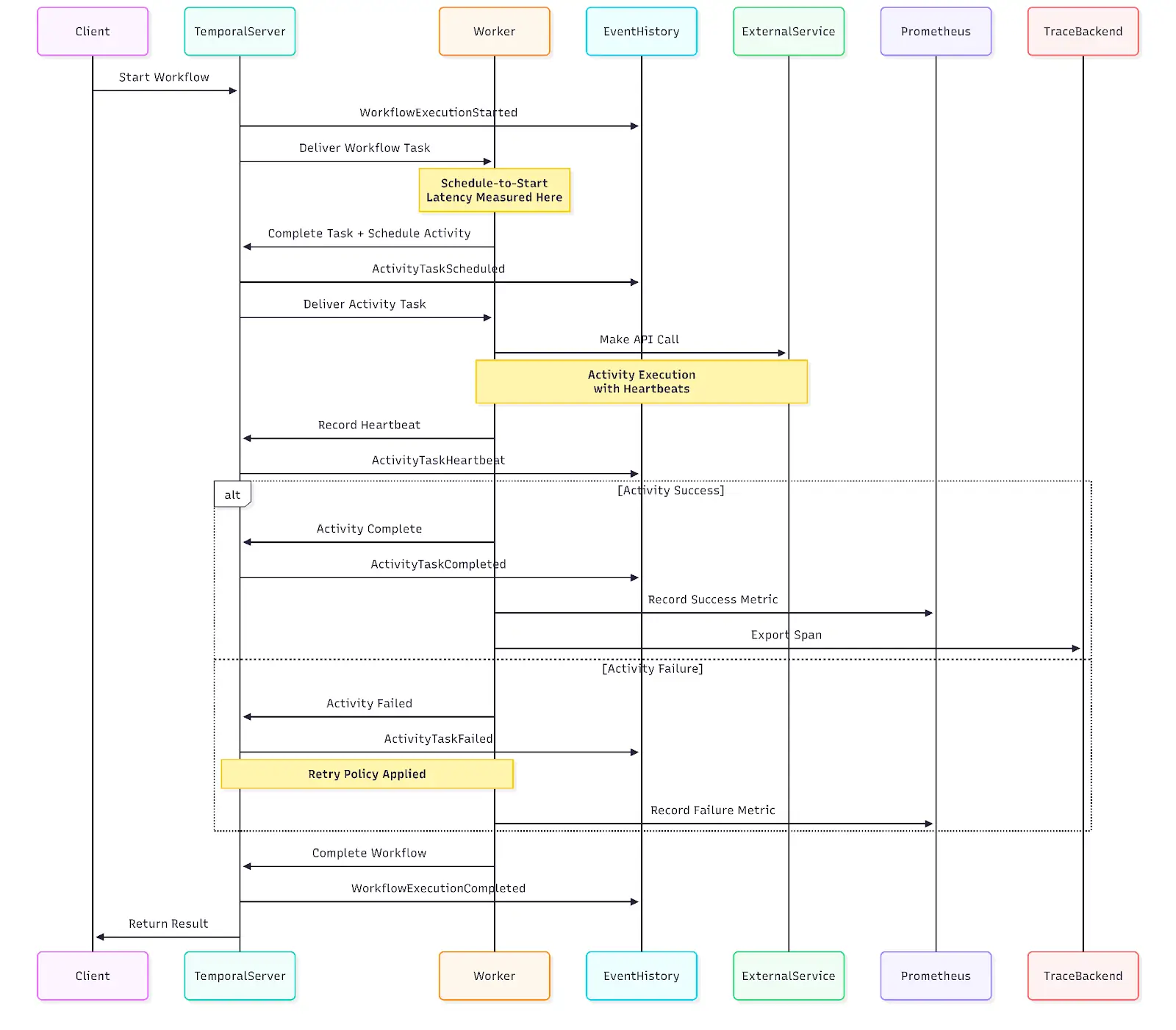
Xgrid deployed workers on Kubernetes with Horizontal Pod Autoscaling tied to schedule-to-start latency—the metric that screams “I need more capacity.”
Separate task queues for different workload types: CPU-intensive ops run on high-core workers with low concurrency, I/O-bound tasks run with high concurrency, GPU workloads get dedicated queues with constrained concurrency.
The result? Workers scale automatically before users notice slowdowns. Resource contention becomes a non-issue.
3. Security Is Not Optional—Encrypt Everything
Temporal stores payloads in plaintext by default. Xgrid implemented a three-layer security stack:
- Data Converter encrypts payloads before reaching Temporal.
- Codec Server allows controlled decryption for debugging.
- Mutual TLS secures all network traffic.
Encryption keys never leave the client infrastructure.
These aren’t optional patterns. Every pattern below exists because:
- A retry happened at the wrong moment
- A workflow ran longer than expected
- A deploy overlapped with in-flight state
- A failure needed to be debugged after the fact
Production reliability is learned the hard way — or designed upfront.
The Reliability Patterns That Prevent 3 AM Pages
-
Make Every Activity Idempotent—Or Pay the Price
Worker crashes, network partitions, and timeouts trigger automatic retries in Temporal.
Xgrid made every activity idempotent to prevent duplicate charges, double bookings, or corrupted state. They implemented a pattern where each activity first checks, “Did this already complete?” before executing.
Xgrid applied database unique constraints, upsert operations, and idempotency tokens for external APIs, and maintained execution logs with unique identifiers for systems without native support.
-
Long-Running Activities Need Heartbeats
Activities running for minutes or hours need heartbeat reporting.
If heartbeats stop, Temporal assumes failure and retries faster than waiting for execution timeout.
Bonus: Heartbeat payloads also include progress info, so retries can resume from the last checkpoint instead of starting over.
-
Sagas for Distributed Transactions
Workflows coordinating multiple services need compensation logic.
Xgrid implemented the Saga pattern: for every forward operation (book flight, reserve hotel, charge payment), there’s a compensating transaction (cancel flight, release hotel, refund payment).
When payment fails after successful bookings, the workflow automatically executes compensations in reverse order.
Track completed operations in workflow state, make compensations idempotent, configure retry policies.
Observability: Production Debugging Without Guesswork
Temporal’s immutable event history enabled deterministic replay of workflow execution. Failures could be reproduced locally by replaying the exact sequence of events under a debugger.
This capability was augmented with operational telemetry:
- Prometheus metrics from workers
- Grafana dashboards focused on schedule-to-start latency, failure rates, task queue depth, and worker health
- Alerts on latency thresholds and failure spikes
The metrics that matter: schedule-to-start latency (primary capacity indicator), failure rates (bugs or downstream issues), task queue depth (early warning of insufficient capacity).
Signals of a Production-Ready Temporal setup
- Schedule-to-start latency stays flat under load
- Worker failures do not require human intervention
- In-flight workflows survive deploys
- Failures can be replayed deterministically
- Scaling happens before users notice
If any of these feel uncertain, risk exists.
The Determinism Trap (And How to Avoid It)
Workflow code is replayed from history. Any non-deterministic behavior causes failures during replay.
Forbidden operations in workflow code: time.Now(), random number generation, network I/O, file system access. These produce different results on each execution.
Use instead: workflow.Now() (timestamps from event history), workflow.NewRandom() (seeded from event history), activities for any I/O operations.
Versioning Without Breaking In-Flight Workflows
Workflows often run for weeks. Code changes were safely introduced using the GetVersion API, ensuring existing executions continued with original logic while new workflows adopted updated behavior.
JavaScript
version = workflow.get_version( “feature-flag-name”,
DEFAULT_VERSION, 2 )
if version == DEFAULT_VERSION:
result = execute_old_logic()
else:
result = execute_new_logic()
Old workflows continue with original logic, new workflows use updated code. No breakage.
For large-scale deployments, worker-based versioning provides cleaner separation: separate workers run different code versions, task queue routing ensures compatibility.
Testing Before Production Exposure
Xgrid leveraged Temporal’s TestWorkflowEnvironment to simulate executions, skip time, and mock activities.
This caught non-deterministic behavior and logic bugs before production, building confidence in high-stakes operations.
Production Pitfalls—And How to Dodge Them
- Payload Compression: Compress large data in the Data Converter; store heavy payloads externally.
- Logging Strategies: Use workflow-aware logging to avoid duplicates; activities can use standard logging.
- Network Proxies: Secure tunnels via gRPC or HTTPS_CONNECT keep workers safe in corporate networks.
- Search Attributes: Plan indexed fields upfront for workflow querying; SQL-only stores limit search functionality.
- Metrics Export: Prometheus, Grafana dashboards, and alerts ensure proactive monitoring.
The Outcome: From “Hope It Works” to “Deploy on Fridays”
The transformation was immediate.
Workflows that once demanded constant attention now run for weeks without intervention.The question “How do we avoid our last nightmare?” was answered clearly: zero data loss, zero workflow corruption, zero manual scaling.
What changed:
- Hands-Off Reliability: Workflows run for weeks without babysitting, even when workers fail.
- Fearless Deployments: Production releases happen anytime—even Fridays—without breaking in-flight workflows.
- Automatic Scaling: Traffic spikes are absorbed seamlessly before customers notice.
- Deterministic Debugging: Critical issues are replayed and fixed in minutes, not hours.
- Secure by Default: End-to-end encryption with full developer visibility and zero friction.
- Engineering Velocity: Teams focus on shipping features instead of managing workflow automation tools and infrastructure.
How enterprises typically reach this state
Teams usually partner with a Temporal-certified Forward-Deployed Engineer (FDE) who:
- Designs production-safe workflow and worker architecture
- Reviews determinism, retries, idempotency, and versioning
- Helps ship real workflows into production
- Transfers patterns so internal teams retain ownership
Deploying Temporal at Scale: It’s Not Plug-and-Play
Running Temporal in production — or planning to?
We run short production readiness reviews covering:
- Worker architecture & scaling signals
- Retry, heartbeat, and idempotency risks
- Versioning and deployment safety
Temporal workflows aren’t like typical services—they rely on temporal durable execution, are long-running, and demand deterministic behavior
Treating Temporal like other workflow orchestration tools is the fastest route to chaos.
Reliability is a design choice: idempotent activities, heartbeats, retry policies, Sagas, deterministic code, and versioning prevent failures from snowballing.
Get architecture right from day one: Temporal Cloud, Kubernetes orchestration, encryption everywhere, observability before production traffic, and workflows built with idempotency and retries baked in.
Do this, and workflows survive production chaos; skip it, and firefighting begins.
Temporal delivers durable execution as a workflow orchestration engine but production-grade deployment requires deliberate architecture, security hardening, and operational discipline.
The teams that succeed are the ones who respect the complexity upfront instead of learning it the hard way in production.
Temporal doesn’t fail in production. Incomplete architecture does.
Teams that succeed design for retries, crashes, deploys, and scale — before production teaches them why they should have.
Related Articles
Related Articles

Established in 2012, Xgrid has a history of delivering a wide range of intelligent and secure cloud infrastructure, user interface and user experience solutions. Our strength lies in our team and its ability to deliver end-to-end solutions using cutting edge technologies.
NAVIGATE
Cloud & DevOps Web & Mobile Apps Temporal Digital Marketing GTM Engineering Marketo Consulting HubSpot Consulting Company Careers ResourcesOFFICE ADDRESS
US Address:
Plug and Play Tech Center, 440 N Wolfe Rd, Sunnyvale, CA 94085
Dubai Address:
Dubai Silicon Oasis, DDP, Building A1, Dubai, United Arab Emirates
Pakistan Address:
Xgrid Solutions (Private) Limited, Bldg 96, GCC-11, Civic Center, Gulberg Greens, Islamabad
Xgrid Solutions (Pvt) Ltd, Daftarkhwan (One), Building #254/1, Sector G, Phase 5, DHA, Lahore
Xgrid © 2026. All rights reserved.