
The Architecture Decisions That Separate Prototypes from Production Systems


Six decisions that look optional in a prototype and become non-negotiable the moment real traffic arrives
TL;DRA Temporal prototype that works in staging can fail in production for six distinct reasons — each one rooted in an architecture decision that felt optional during development but is not optional under real load. Those decisions are: retry policy design, activity timeout coverage, workflow determinism, payload sizing, worker capacity planning, and observability instrumentation. This post covers what the wrong choice looks like, why it survives staging, and what the production-correct version requires. |
Why Prototypes Survive Staging But Break in Production
A Temporal prototype that passes staging has demonstrated one thing: the workflow executes correctly when everything goes right, at low volume, with healthy dependencies, and with an engineer watching. That is a meaningful achievement. It is not sufficient evidence of production readiness.
Production introduces conditions that staging structurally cannot simulate: workers that restart after running for days rather than minutes, thousands of concurrent workflows generating retry load when a dependency goes down, task queues backing up faster than workers can drain them, and failures that compound for hours before anyone notices. The architecture decisions that determine how a system behaves under these conditions are made in code long before production traffic arrives.
The diagram below maps each decision area across the prototype and production states. The right column is not an aspirational standard — it is the minimum required to avoid the class of incidents that teams experience in their first weeks of production traffic.
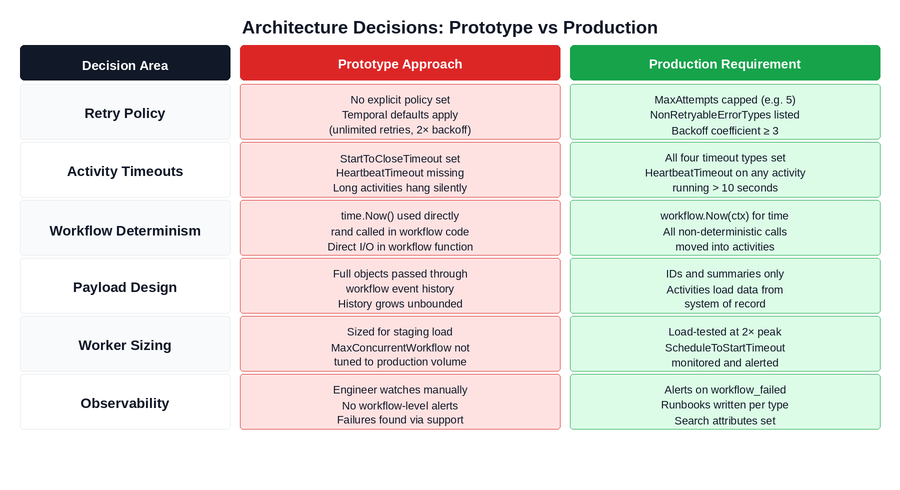 Figure 1: The six architecture decision areas and what each looks like in a prototype vs a production-safe system. Red cells are the prototype defaults that cause production incidents. Green cells are the production requirements.
The Pattern Across All SixIn every case, the prototype approach is not wrong for a prototype. It is wrong for production because it was designed around conditions that production does not provide: short execution windows, low concurrency, healthy dependencies, and a human observer. Each architecture decision needs to be revisited explicitly before production go-live. |
PREPARING TEMPORAL WORKFLOWS FOR PRODUCTION?A Temporal workflow that works in staging is not automatically production-ready. Real traffic introduces retry storms, worker saturation, payload growth, replay failures, observability gaps, and dependency outages that prototypes rarely expose. Xgrid’s Temporal Production Deployment Checklist helps teams validate retries, timeouts, determinism, worker scaling, payload design, observability, security, and versioning before production gaps impact users or billing. |
Decision 1: Workflow Determinism
Temporal’s durability model works by replaying your workflow function against its recorded event history to reconstruct state after a worker restart. For this to work correctly, the workflow function must be deterministic: given the same event history, it must always produce the same sequence of commands. A workflow function that produces different commands on replay creates a mismatch against the recorded history and gets permanently stuck.
In a prototype, this constraint is invisible. Workers restart infrequently, workflows complete in minutes, and the window between original execution and replay is so short that even non-deterministic values like timestamps change negligibly. The determinism bug is already present in the code — the conditions to trigger it simply do not exist in staging.
In production, a workflow running an approval process that has been open for four days experiences a worker restart. The replay executes the same workflow function but reads a current timestamp instead of the original one. The function takes a different branch. The event history shows Activity A was scheduled; the replay tries to schedule Activity B. Temporal detects the mismatch. The workflow is stuck permanently.
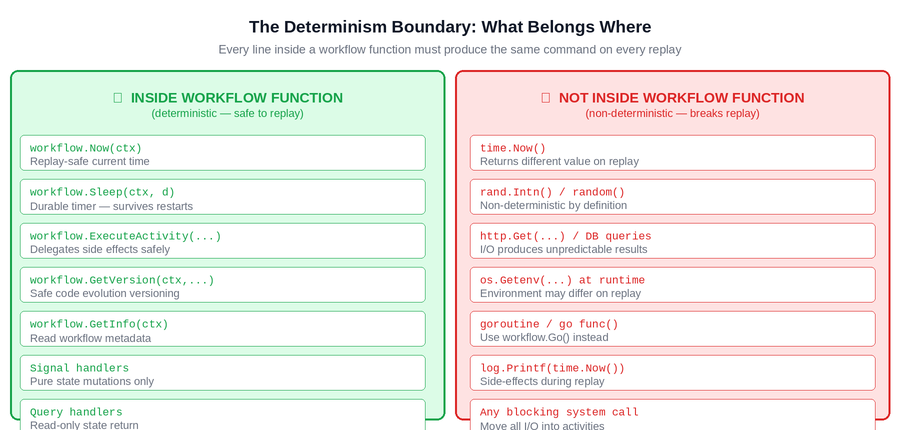
Figure 2: The determinism boundary. Everything on the left is safe inside a workflow function because it produces the same result on every replay. Everything on the right must be moved into activities — it produces different results and will break replay in production.
The boundary is absolute: every line inside a workflow function must produce the same command on every replay, regardless of when the replay happens or on which machine. The safe alternatives exist for every common non-deterministic operation — workflow.Now(ctx) for time, workflow.Go() for concurrency, activities for all I/O. The production requirement is applying them consistently across every workflow function in the codebase.
How to Verify Before Go-LiveWrite a test that deliberately restarts the worker mid-workflow and verifies the workflow resumes and completes correctly. Run the Temporal workflow replayer against your workflow histories after every code change. Audit every workflow file for time.Now(), rand, and direct I/O — these are the three patterns that consistently cause non-determinism errors in production. |
Decision 2: Retry Policy Design
Every Temporal activity has a retry policy. If no explicit policy is set, Temporal applies its defaults: unlimited retries, one-second initial interval, 2x backoff coefficient, 100-second maximum interval. In a prototype with a handful of concurrent workflows, this policy is invisible. An activity fails, retries a few times, and the workflow either completes or fails cleanly.
In production with thousands of concurrent workflows, the default retry policy creates two compounding problems. When a downstream dependency goes down, every workflow waiting on an activity against that dependency begins retrying according to the same policy simultaneously. The task queue receives tens of thousands of retry attempts. When the dependency recovers, it is immediately hit by all of them at once — which can crash it again. Separately, business validation errors that will never succeed on retry — invalid input, entity not found, insufficient funds — are retried until MaxAttempts is exhausted, burning action budget that delivers no value.
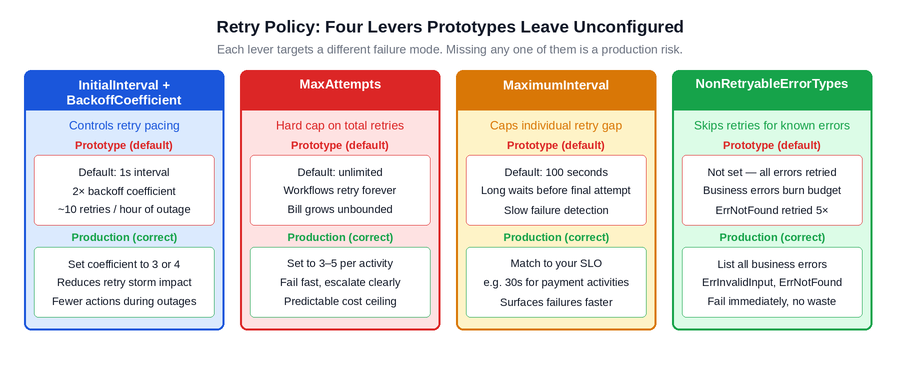
Figure 3: The four retry policy levers and what each one addresses. Prototypes typically leave all four at defaults. Production requires each one to be set explicitly to reflect the failure characteristics of the specific dependency being called.
The production requirement is an explicit retry policy on every activity, with four specific decisions made: a higher backoff coefficient to reduce retry density during outages, a hard MaxAttempts cap to prevent runaway retries, a MaximumInterval that reflects the business deadline rather than an arbitrary default, and a NonRetryableErrorTypes list that captures every business error class that retrying cannot fix.
How to Verify Before Go-LiveRun a load test with a simulated dependency outage. Take down the dependency, start your normal workflow volume, and observe the action count over 30 minutes. If the numbers are alarming at staging volume, they will be significantly worse at production volume. Fix the retry policies before go-live, not after the first billing spike or the first dependency that cannot recover from a retry storm. |
Decision 3: Activity Timeout Coverage
Temporal provides four distinct timeout types for activities, each targeting a different failure mode. Prototypes typically configure StartToCloseTimeout and nothing else. That leaves three gaps that production will find.
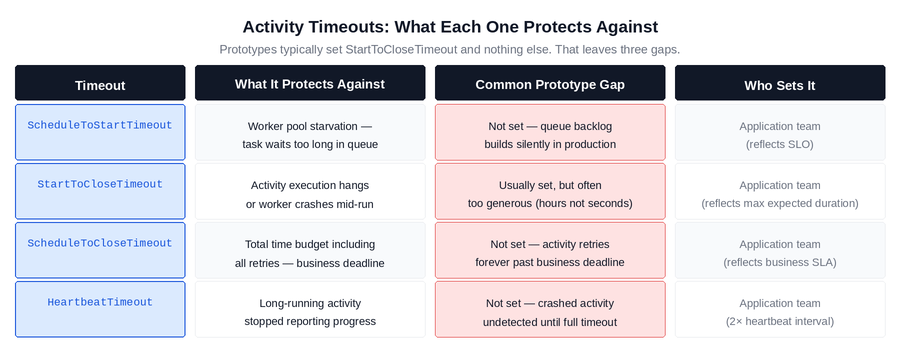
Figure 4: The four activity timeout types, what each protects against, and the gap that the prototype default creates. All four are application-team decisions because only the application team knows the business SLO, expected activity duration, and heartbeat interval.
The most consequential missing timeout in production systems is HeartbeatTimeout on long-running activities. An activity that runs for minutes without calling RecordHeartbeat() is invisible to Temporal during that time. If the worker crashes mid-execution, Temporal has no way to know until the StartToCloseTimeout expires — which is often configured generously, meaning the failure is silent for the entire timeout duration. With HeartbeatTimeout set correctly, Temporal detects the crash within seconds of the heartbeat gap and reschedules the activity immediately.
ScheduleToStartTimeout is the second commonly missing timeout, and its absence creates a different failure mode: worker pool saturation. When the task queue builds up faster than workers can drain it, activities sit waiting for a worker to pick them up. Without ScheduleToStartTimeout, workflows wait indefinitely for a worker slot. With it set, workflows fail fast and surface the capacity problem through the monitoring stack rather than through silent queue buildup.
How to Verify Before Go-LiveAudit every activity registration and confirm all four timeout types are explicitly set. For any activity that runs longer than 10 seconds, confirm HeartbeatTimeout is set and the activity calls RecordHeartbeat() on a regular interval. For queue-depth issues, set ScheduleToStartTimeout to reflect your SLO and alert on schedule_to_start_latency P99. |
Decision 4: Payload Design
Temporal’s event history is a durability log for execution state. It is not a data store or a message bus. When workflows pass full object graphs, row lists, or API responses through their history — as inputs to activities, as outputs from activities, as workflow inputs and outputs — every payload is written permanently to the event history and retained for the full retention window after the workflow closes.
In a prototype processing a handful of workflows with small datasets, this is invisible. In production, a workflow type that passes a full dataset through its history generates histories measured in hundreds of kilobytes per execution. At production volume and a standard retention window, this translates into storage costs that grow silently with every execution until someone examines the billing dashboard.
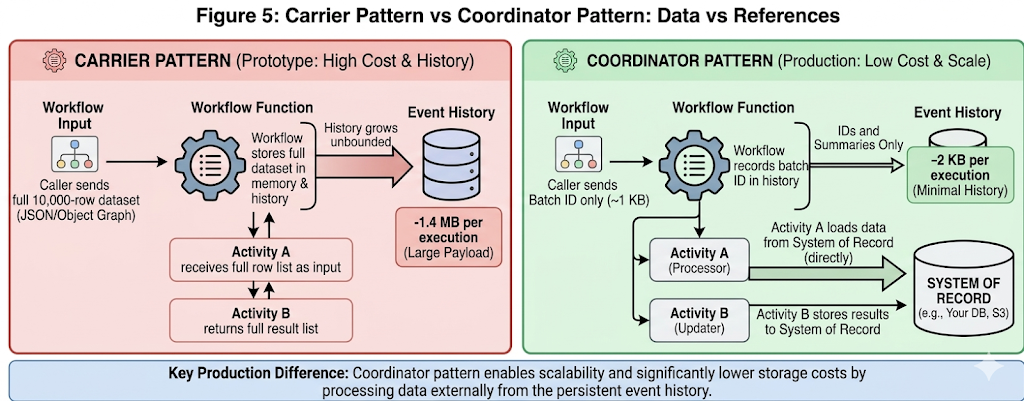
Figure 5: Carrier pattern vs coordinator pattern. In the carrier pattern, the full dataset travels through the event history at every step. In the coordinator pattern, only a reference travels through the workflow — the activity loads what it needs directly from the system of record. The history size difference is typically 100–700x.
The production requirement is the coordinator pattern: workflow inputs, activity inputs, and activity outputs contain identifiers, counts, status codes, and summaries. The actual data lives in the system of record and is loaded by the activity that needs it. The workflow history records what happened — not the data that was processed.
| How to Verify Before Go-Live
Inspect the average event history size for each workflow type in the Temporal Cloud metrics. Any workflow type with histories consistently above 50KB is a candidate for payload reduction. The fastest diagnostic: look at the inputs and outputs of each activity call in the workflow function. If any of them contain lists, full objects, or API response bodies, the coordinator pattern has not been applied. |
Decision 5: Worker Capacity Planning
Temporal workers have configurable limits on the number of concurrent workflow tasks and activity tasks they can execute simultaneously. In a prototype environment, these limits are never the constraint. The concurrent workflow count in staging is low enough that workers always have available capacity, and the limits — whatever they are set to — are never tested.
In production, real traffic fills the task queue. If the combined capacity of all worker instances is lower than peak concurrent workflow task demand, tasks sit in the queue waiting for a worker slot. ScheduleToStartTimeout begins firing for tasks that wait too long. Workflows fail not because their activities failed, but because the activities never started. The failure looks like a timeout error. The root cause is worker pool sizing.
The production requirement is sizing the worker pool against measured peak load, not against staging load or average load. The relevant metric to watch during load testing is temporal_activity_schedule_to_start_latency: if P99 is climbing under load, the worker pool is undersized. The correct approach is to load test at 2x the expected peak concurrent volume before go-live and size the pool to handle that load with headroom.
How to Verify Before Go-LiveRun a load test at 2x your expected peak concurrent workflow volume. Monitor temporal_activity_schedule_to_start_latency throughout. A P99 above 500ms indicates the worker pool is becoming a bottleneck. Size for peak, not average — production traffic is not evenly distributed and capacity constraints surface at the peaks. |
Decision 6: Observability Instrumentation
In a prototype, the engineer is the monitoring system. A workflow fails and someone sees it within minutes. The failure is investigated, the root cause is identified, and the fix is deployed. This works because the observer is always present and the volume is manageable.
In production, nobody is watching individual workflows. A workflow type with a 10% structural failure rate running at 5,000 executions per day produces 500 failed workflows before the end of the first business day. Without an alert on temporal_workflow_failed segmented by workflow type, those failures accumulate invisibly until a customer reports a problem or a downstream system shows a discrepancy. By then, the failure count is in the thousands and the root cause investigation covers days of history rather than minutes.
The production requirement has three components: workflow-level alerting that fires when failure rates exceed a threshold, custom search attributes set at workflow start so that support and operations can query workflows by business identifiers (merchant ID, order ID, customer ID) without requiring engineering involvement, and runbooks that give on-call engineers a documented path to diagnosis and resolution for the top failure modes of each workflow type.
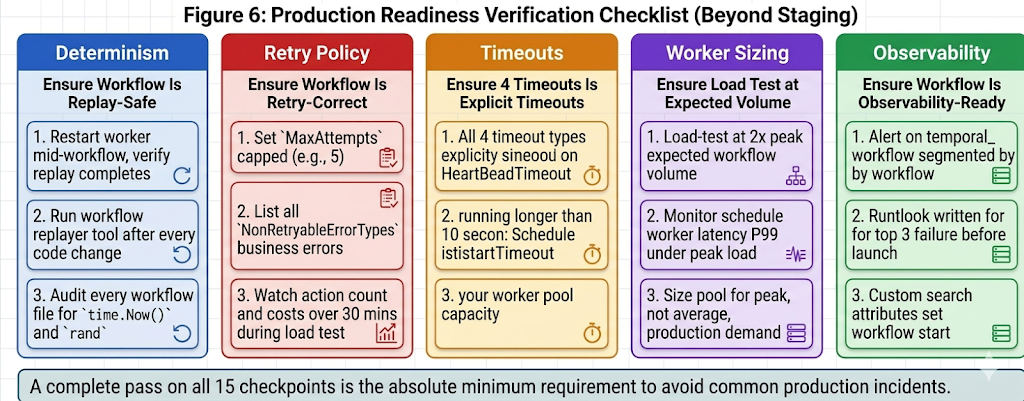
Figure 6: Production readiness verification by category. Each card represents a distinct property that requires deliberate verification beyond standard staging tests. All five must be confirmed before a new workflow type goes to production.
These are not operational enhancements to add after launch. They are go-live prerequisites. The difference is significant: adding observability before go-live means incidents are detected in minutes and diagnosed with context. Adding it after go-live means the first week of production incidents produces the alerting and runbook infrastructure that should have existed from day one.
How to Verify Before Go-LiveTreat observability as a go-live criterion, not a backlog item. Before any new workflow type goes to production: confirm an alert is configured on temporal_workflow_failed for that workflow type, confirm custom search attributes are set at workflow start, and confirm a runbook covering the top three failure modes and their remediation steps has been written and reviewed by the on-call rotation. |
Production Readiness Checklist for Temporal Workflow Architecture
Before moving a Temporal workflow from prototype to production, confirm:
- Workflow code is deterministic and replay-safe
- Workflow code uses Temporal-safe APIs such as workflow.Now() instead of system time
- Randomness, direct I/O, external API calls, and database access are kept inside Activities
- Workflow histories are tested with the Temporal workflow replayer after code changes
- Every Activity has an explicit retry policy
Closing Thoughts
None of the six decisions in this post are difficult to get right. They are each a small number of lines of code or configuration, and the correct choices are well-documented. What makes them a production risk is the timing: they are all easy to defer during prototype development because the consequences of deferring them are invisible in staging.
The teams that avoid first-week production incidents are not the ones who wrote better workflow logic. They are the ones who treated the six decisions above as go-live criteria rather than post-launch improvements. The difference is a structured checklist applied before the production cutover date, not engineering judgment applied retrospectively after the first incident reveals what was missing.
If your team is preparing a Temporal workflow for production and is not certain that all six of these decisions have been made explicitly rather than defaulted, the production readiness checklist in Figure 6 is the starting point. Each category corresponds to a specific class of production incident. Verifying all six before launch is significantly less expensive than diagnosing any one of them after it.
Frequently asked questions about Temporal production readiness
What makes a Temporal workflow production-ready?
A production-ready Temporal workflow is deterministic, observable, scalable, and configured with explicit retry, timeout, payload, and worker-capacity decisions.
It should be tested against real failure modes such as dependency outages, worker restarts, queue saturation, and replay after code changes.
Why do Temporal prototypes fail in production?
Temporal prototypes often fail in production because staging does not expose real traffic volume, long-running execution, retry storms, or worker saturation.
The workflow logic may be correct, but missing architecture decisions around retries, timeouts, payloads, and observability can still cause incidents.
What should teams check before launching Temporal workflows?
Teams should review workflow determinism, retry policies, timeout coverage, payload size, worker scaling, Search Attributes, alerts, and runbooks.
Each of these areas maps to a production failure mode that may not appear during local testing or low-volume staging runs.
How do you test Temporal workflows for production readiness?
Teams should run replay tests, simulate dependency outages, crash workers mid-execution, load test worker queues, and inspect workflow histories for payload size.
They should also confirm alerts, dashboards, and operational runbooks are ready before the workflow receives production traffic.
Is your team still unsure which architecture decisions are missing before going live?
If the answer to “is this workflow production-ready?” still requires an engineer to think through each failure mode individually before every launch — that’s a structured review gap that compounds with every new workflow type.
Xgrid Offers two entry points depending on where you are:
- Temporal Launch Readiness Review — we review your workflow designs against the six decisions above, identify which are unresolved, and deliver a concrete go / no-go scorecard before you launch. Two weeks, fixed scope.
- Temporal Reliability Partner — for teams that want a named Temporal expert embedded long-term to run architecture reviews before new workflows go live and catch production-readiness gaps before they become incidents.
Both are fixed-scope. No open-ended retainer required to get started.
Related Temporal Production Guides
- For retry policy tuning, dependency outages, and action-cost control, read: Temporal Retry Policies at Scale
- For Search Attributes, stuck workflows, replay-safe logging, and production dashboards, read: Temporal Observability in Production Guide
- For payload sizing, workflow history growth, and the coordinator pattern, read: Workflows as Coordinators, Not Carriers: How Oversized Payloads Silently Inflate Your Temporal Bill
- For heartbeats, Continue-As-New, signal handling, and replay failures in long-running workflows, read: Long-Running Temporal Workflows in Production
Related Articles
Related Articles

Established in 2012, Xgrid has a history of delivering a wide range of intelligent and secure cloud infrastructure, user interface and user experience solutions. Our strength lies in our team and its ability to deliver end-to-end solutions using cutting edge technologies.
NAVIGATE
Cloud & DevOps Web & Mobile Apps Temporal Digital Marketing GTM Engineering Marketo Consulting HubSpot Consulting Company Careers ResourcesOFFICE ADDRESS
US Address:
Plug and Play Tech Center, 440 N Wolfe Rd, Sunnyvale, CA 94085
Dubai Address:
Dubai Silicon Oasis, DDP, Building A1, Dubai, United Arab Emirates
Pakistan Address:
Xgrid Solutions (Private) Limited, Bldg 96, GCC-11, Civic Center, Gulberg Greens, Islamabad
Xgrid Solutions (Pvt) Ltd, Daftarkhwan (One), Building #254/1, Sector G, Phase 5, DHA, Lahore
Xgrid © 2026. All rights reserved.