
Durable AI Chatbot Development with Temporal


In the rapidly evolving world of Generative AI, developers face a persistent hurdle: Memory. LLMs are inherently stateless. If a server crashes, a user swaps devices, or a conversation spans days, the context is often lost, leading to frustrating user experiences. That’s why many bots feel great in a demo but often fail at scale.
Temporal offers a cleaner model: treat each conversation as a durable workflow instead of a short-lived “session.” You get reliable state, fault tolerance, and a scalable chatbot system without pushing orchestration complexity into your API layer. This workflow-first approach is especially useful for teams building an enterprise AI chatbot development service where durability and observability are non-negotiable.
TL;DR
- Treat each conversation as one Temporal Workflow (durable, resumable, inspectable).
- Drive chat turns using Workflow Updates (best for request/response) or Signals + async delivery (best for streaming UIs).
- Keep external work in Activities (LLM calls, RAG retrieval, DB writes, tool calls).
- Scale safely with summarization + rolling context + Continue-As-New to control workflow history growth.
- Use Temporal’s execution history for debuggability and auditability: what failed, what retried, what it’s waiting on.
The Temporal Model: One Durable Workflow per Conversation
Temporal gives you a cleaner mental model:
A conversation is a long-running workflow, not a short-lived session.
That means the conversation’s control flow and compact state live in a durable execution, not in a specific API server instance.
Why this changes the game:
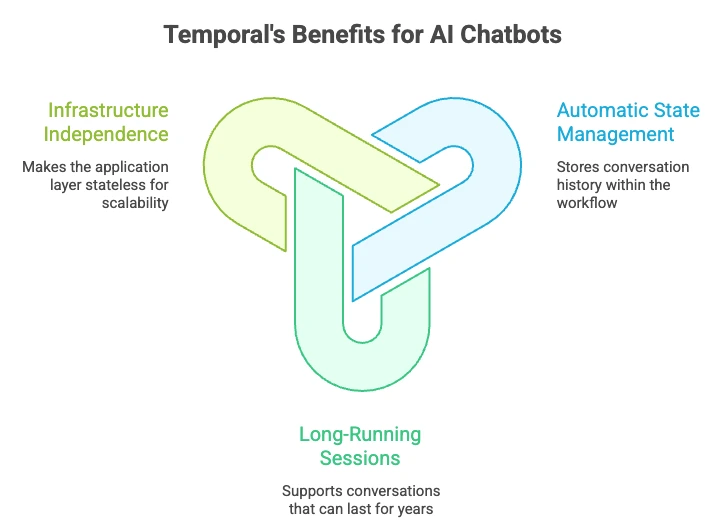
- Automatic State Management: Temporal persists workflow execution history, allowing state to be reconstructed deterministically via replay.
- Long-Running Sessions: Workflows can run for seconds or years. If a user stops chatting and returns a week later, the workflow is simply waiting. It consumes no compute resources while waiting for an external signal (like a user prompt).
- Infrastructure Independence: Because the state is stored in Temporal, your application layer becomes stateless. This eliminates the need for “sticky sessions” or load balancers tied to specific instances, allowing for infinite horizontal scaling.
Practical note: for very long transcripts, you’ll often store a full transcript externally (DB/object store) and keep a compact state in the workflow (recent turns + summary). Temporal still provides the durable execution backbone.
Signals, Queries, and Updates: The Building Blocks of Reliable AI Chatbot
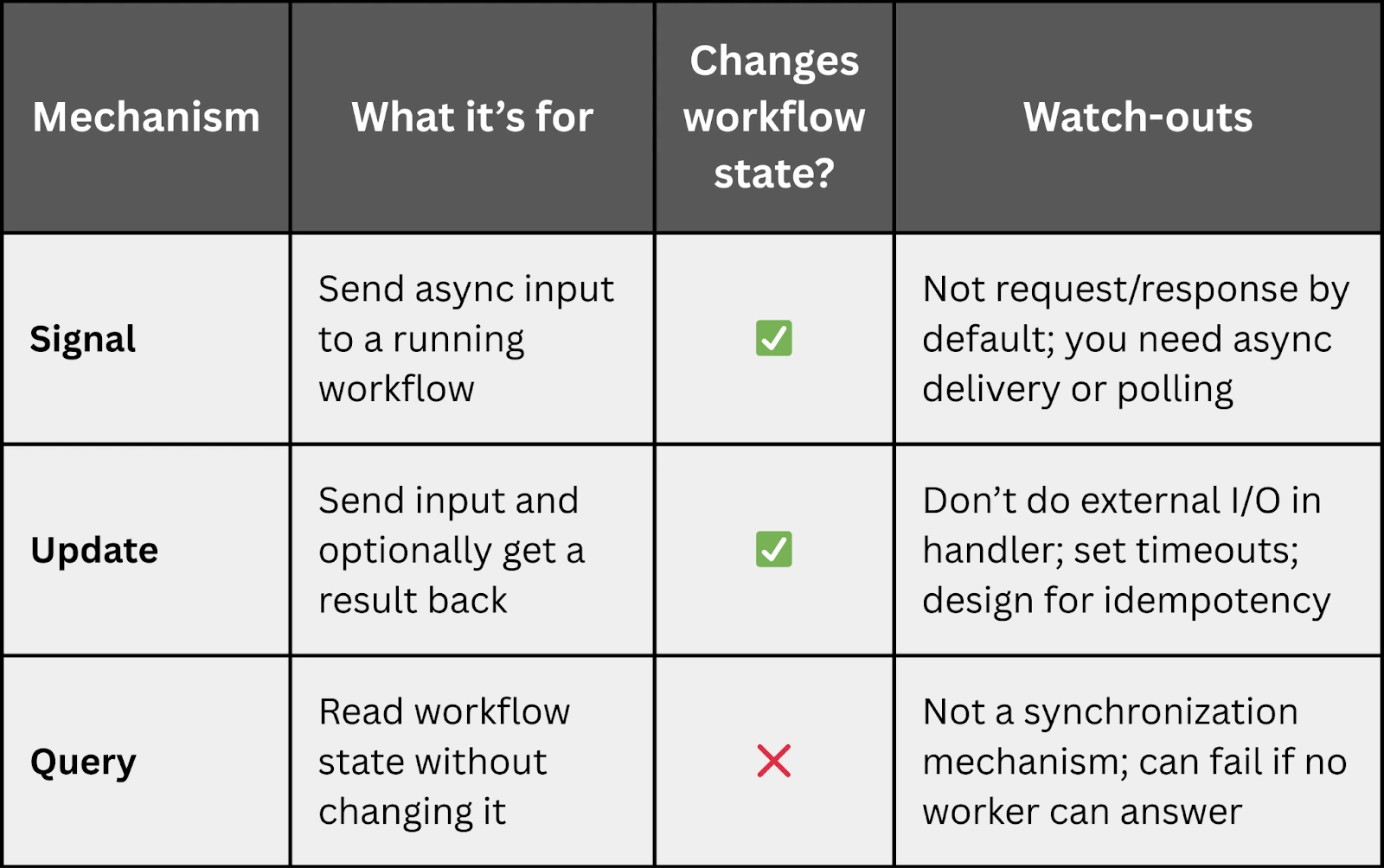
To interact with a running workflow (conversation), Temporal uses Signals and Queries.
- Signals are used to inject data into a running workflow, such as a user’s new message.
- Queries allow you to retrieve data from the workflow without changing its state, such as fetching the current chat history for the UI.
Together, they let you build production-grade chatbots where conversation control-flow lives in workflow code, while your web/API layer stays simple.
Returning a Response: Updates vs Signals
One common “gotcha” when implementing an AI chatbot development service with Temporal is:
How do I send a user prompt and return the bot response in the same HTTP request?
You typically have three options:
- 1. Workflow Updates (recommended for request/response): Use an Update handler that takes the user prompt and returns the bot response. This gives you natural request/response semantics.
- 2. Signal + async response channel (common for chat UIs): Signal the workflow, then deliver the bot response via WebSocket/SSE, polling, pub/sub, etc.
- 3. Signal + Query (limited): Signal the workflow, then query for updated state until the response is ready. This can work, but be mindful of UX and polling load.
If you want your API to feel synchronous (send message → return answer), Updates are often the cleanest approach for production.
Advanced Architecture: The “Session-less” Chatbot
For scalable chatbot systems, such as support bots, internal copilots, tool-using agents, the biggest win is eliminating “session ownership” from the application server.
A common AI chatbot architecture pattern:
- Proxy API: Your backend receives a message and checks if a workflow exists for that conversation/user.
- Resume or create: If it exists, signal it. If not, start a new workflow and then signal it.
- Resilience: If an API, database, vector store, or LLM endpoint fails mid-turn, the workflow can pause, retry, and resume where it left off once the dependency recovers, without losing state or forcing the user to restart.
This is workflow orchestration applied to conversational AI: you keep the “happy path” readable, and let Temporal handle durable execution, retries, timeouts, and persistence.
BUILDING AI CHATBOTS THAT REMEMBER, RECOVER, AND SCALE?AI chatbot demos often break in production when session state disappears, LLM calls time out, RAG fails mid-turn, or long chats outgrow the application layer. Xgrid’s Temporal practice helps teams design durable conversational workflows that persist, pause, resume, retry, and stay observable across crashes, device switches, tool calls, RAG retrieval, and human handoffs. |
End-to-End Flow: Update-Driven Request/Response
Below is an illustrative pseudo-code (the exact syntax varies by Temporal SDK). The important design points:
- workflow owns control flow + compact state
- Activities do all external calls
- Update handler gives natural request/response semantics
# PSEUDO-CODE (illustrative)
workflow_state = {
“summary”: “”,
“recent_turns”: [],
“conversation_id”: “…”,
}
@workflow.update
async def send_message(user_text: str) -> str:
# 1) Build the prompt context (compact!)
context = build_context(
workflow_state[“summary“],
workflow_state[“recent_turns“]
)
# 2) Retrieve facts (RAG) via Activity
docs = await activities.retrieve(user_text, context)
# 3) Call the LLM via Activity
bot_text = await activities.call_llm(user_text, context, docs)
# 4) Update compact state
workflow_state[“recent_turns“].append({
“user“: user_text,
“bot“: bot_text
)}
workflow_state = maybe_summarize_and_trim(workflow_state)
# 5) Return response to API caller
return bot_text
Key Takeaway
The “magic” isn’t the loop or the handler. It’s that the conversation’s state and control flow live in a durable, replayable workflow—so the system can survive crashes, deployments, and flaky dependencies without losing context.
Observability in Production
Because workflow executions have an inspectable history, you can answer: What step failed? Did it retry? What is it waiting on right now? That kind of visibility is a practical advantage when operating high-traffic conversational systems.
RAG + Time-Aware Micro-Memory: Keep Answers Auditable
If your bot needs up-to-date or regulated answers, chat history alone isn’t enough. Most teams add RAG; the next step is tracking how facts change over time.
Micro-memory pattern
Store retrieved facts as timestamped triples:
- Subject–Predicate–Object
- plus validity windows like valid_at / expired_at
Example shape:
{
“subject”: “Refund policy”,
“predicate”: “max_days”,
“object”: “30”,
;”valid_at”: “2026-01-10T00:00:00Z”,
“expired_at”: null,
“source”: “policy_doc_v17”
}
Benefits:
- Dynamic updates: mark outdated facts as expired (don’t delete) so you preserve prior truth.
- Time-travel querying: answer “what was the guidance before the correction?” by filtering facts by time.
Temporal workflows fit well because they can coordinate:
- ingestion jobs
- invalidation rules
- re-indexing workflows
- notifications to affected systems
…as reliable, replayable processes.
Inactivity and Cleanup
While workflows can run forever, you generally want to wrap up abandoned conversations.
- Inactivity Timeouts: You can implement logic where the workflow listens for user input for a set time (e.g., N hours). If the timeout triggers, the workflow can automatically generate a conversation summary, save it to a database, and close cleanly.
- History Limits and Continue-As-New: For very long chats, stay mindful of workflow history growth (a common guideline is keeping it under ~50,000 events). Use Continue-As-New (or the Entity Pattern) to roll over executions while keeping a compact summary.
Production Pitfalls & Best Practices
If you want Temporal-based chatbots to stay stable at scale, these guardrails matter:
- Keep all external calls in Activities. LLM calls, RAG retrieval, DB reads/writes, tool calls—these should be Activities, not Workflow code.
- Plan for response delivery early. If your product needs request/response semantics, favor Workflow Updates. If it’s a streaming chat UI, design for async delivery (SSE/WebSockets).
- Control history growth. Summarize periodically and use Continue-As-New. Avoid appending unlimited raw transcript to workflow state.
- Be intentional about retries. Retries are powerful—but if a tool call has side effects, make it idempotent or use unique request IDs to prevent duplicates.
- Test failure modes on purpose. Kill workers, simulate 500s from vector DB, break the LLM endpoint, add latency—your system should recover without the user losing context.
Production readiness checklist for Temporal-based AI chatbots
Before shipping a durable AI chatbot with Temporal, confirm:
- Each conversation maps to a durable Workflow with compact state
- LLM calls, RAG retrieval, DB writes, and tool calls run as Activities
- Updates, Signals, or async delivery are chosen based on the chat UX
- Full transcripts are stored externally while the Workflow keeps summaries and recent turns
- Continue-As-New, inactivity cleanup, and observability are planned for long-running conversations
Getting Started with Temporal for Chatbots
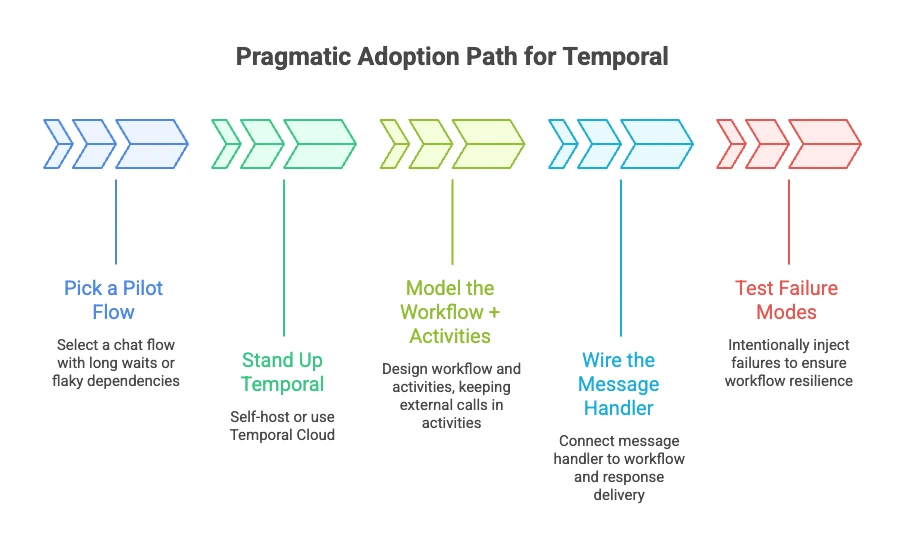
A pragmatic adoption path:
- 1. Pick a pilot flow: Choose a chat flow with long waits, multi-step backends, or flaky dependencies—where durability pays off immediately.
- 2. Stand up Temporal: Self-host or use Temporal Cloud; decide early how you’ll operate it (persistence, upgrades, backups).
- 3. Model the workflow + activities: Keep external calls (LLM, databases, RAG retrieval) in Activities; keep orchestration in the Workflow.
- 4. Wire the message handler: On each message: locate/start the workflow, call an Update to get a response synchronously, or Signal it and deliver the response asynchronously via SSE/WebSocket.
- 5. Test failure modes on purpose: Kill workers, break downstream APIs, inject timeouts. Workflows should continue correctly, not just in the “happy path.”
If you want to move faster without reinventing patterns, partnering with an experienced team can help. Xgrid’s Temporal consulting focuses on getting a first production workflow shipped with strong operational guardrails—then enabling your team to scale the approach confidently.
FAQ: Temporal + AI Chatbot Development
1) Can I return the chatbot answer in the same HTTP request?
Yes—use Workflow Updates (request/response). Signals are async by default.
2) How do I handle streaming tokens?
Typically by sending partial results through a streaming channel (SSE/WebSocket) while the workflow tracks progress and final output.
3) Should I store the full transcript in workflow state?
Usually no. Store a rolling window + summary in the workflow, and persist the full transcript externally.
4) What happens if the LLM call fails mid-turn?
The Activity can retry automatically (with backoff). The workflow resumes exactly where it left off once the dependency recovers.
5) How do I avoid duplicate side effects when retries happen?
Design Activities to be idempotent: use request IDs, dedupe keys, or transactional writes.
Next Steps: Ship Resilient AI Chatbot Services with Temporal
Temporal turns “chat sessions” into durable, observable workflows: state persists, failures are survivable, and your application layer stays simple. That combination is hard to achieve with homegrown session management and ad hoc retries.
Ready to make AI chatbot development with Temporal easier? Explore how Xgrid can help you adopt Temporal workflows, apply proven architecture patterns, and ship resilient, scalable chatbot systems with fewer surprises.
Related Temporal and AI workflow guides
- For the broader multi-agent orchestration problem, read: Agentic AI Orchestration with Temporal: Solving Multi-Agent System Challenges
- For moving AI agents from demos to reliable production systems, read: Agentic AI with Temporal: From Prototypes to Production
- For long-running agent memory, crash recovery, and durable execution, read: Why Long-Running AI Agents Crash — Fix with Temporal
- For sandboxed agents, durable sessions, and OpenAI Agents SDK architecture, read: Temporal + OpenAI Agents SDK Sandbox: What It Means for Production AI Workflows
Related Articles
Related Articles

Established in 2012, Xgrid has a history of delivering a wide range of intelligent and secure cloud infrastructure, user interface and user experience solutions. Our strength lies in our team and its ability to deliver end-to-end solutions using cutting edge technologies.
NAVIGATE
Cloud & DevOps Web & Mobile Apps Temporal Digital Marketing GTM Engineering Marketo Consulting HubSpot Consulting Company Careers ResourcesOFFICE ADDRESS
US Address:
Plug and Play Tech Center, 440 N Wolfe Rd, Sunnyvale, CA 94085
Dubai Address:
Dubai Silicon Oasis, DDP, Building A1, Dubai, United Arab Emirates
Pakistan Address:
Xgrid Solutions (Private) Limited, Bldg 96, GCC-11, Civic Center, Gulberg Greens, Islamabad
Xgrid Solutions (Pvt) Ltd, Daftarkhwan (One), Building #254/1, Sector G, Phase 5, DHA, Lahore
Xgrid © 2026. All rights reserved.