
Why Synchronous Customer Onboarding Breaks at Scale


In the first ten accounts, synchronous customer onboarding feels like a feature, not a flaw. You run a kickoff call, answer questions live, line up integrations, and move the customer forward with a shared sense of momentum.
The problem starts when growth turns that same motion into a queue. Calendar availability becomes the control plane. Status gets buried in email, Slack, ticket comments, and someone’s memory. Every failed import, missing document, or security approval adds another round trip.
That is why synchronous customer onboarding breaks at scale. The onboarding journey is not really a sequence of meetings. It is a long-running, stateful, multi-step workflow spanning systems, teams, and customer actions. Once you see it that way, the next step is clear: stop treating onboarding like a set of live sessions and start treating it like customer onboarding automation backed by workflow orchestration.
What Is Customer Onboarding Automation?
Customer onboarding automation is the use of workflow-driven systems to manage setup, provisioning, approvals, integrations, reminders, and customer actions without relying on manual follow-ups or live coordination for every step.
Instead of moving the customer forward through meetings, inboxes, and ad hoc checklists, automation moves onboarding forward through durable workflow state. That means tasks can run in parallel, wait safely on external inputs, retry automatically when systems fail, and expose a clear current status to internal teams and customers alike.
The goal is not to remove humans from onboarding. It is to remove humans from carrying routine state between systems, so they can focus on judgment, exceptions, and customer-specific decisions.
Customer Onboarding at Scale Is a Workflow Problem
Modern customer onboarding rarely lives inside one app or one team. It touches CRM data, identity, provisioning, billing, security reviews, sandbox setup, data migration, notifications, approvals, and customer-side dependencies. Some tasks can run in parallel. Others must wait on an external event. Some need retries. Some need a human decision.
That is not a scheduling problem. It is a workflow problem.
| What breaks first | What it looks like in a synchronous model | Why it gets worse at scale |
| Calendar throughput | More kickoff calls, more follow-ups, more unblocker meetings | Work waits for availability instead of readiness |
| State management | Progress tracked in notes, inboxes, Slack threads, spreadsheets | No single source of truth |
| Failure recovery | Someone manually resends, rechecks, or reruns a step | Recovery becomes inconsistent and slow |
| Dependency handling | Teams wait on one another in sequence | Parallel work gets serialized |
| Visibility | “Where is this customer stuck?” requires asking around | Reporting lags behind reality |
The key mistake is assuming synchronous onboarding is “high touch” by design. In reality, it often becomes high friction by accident.
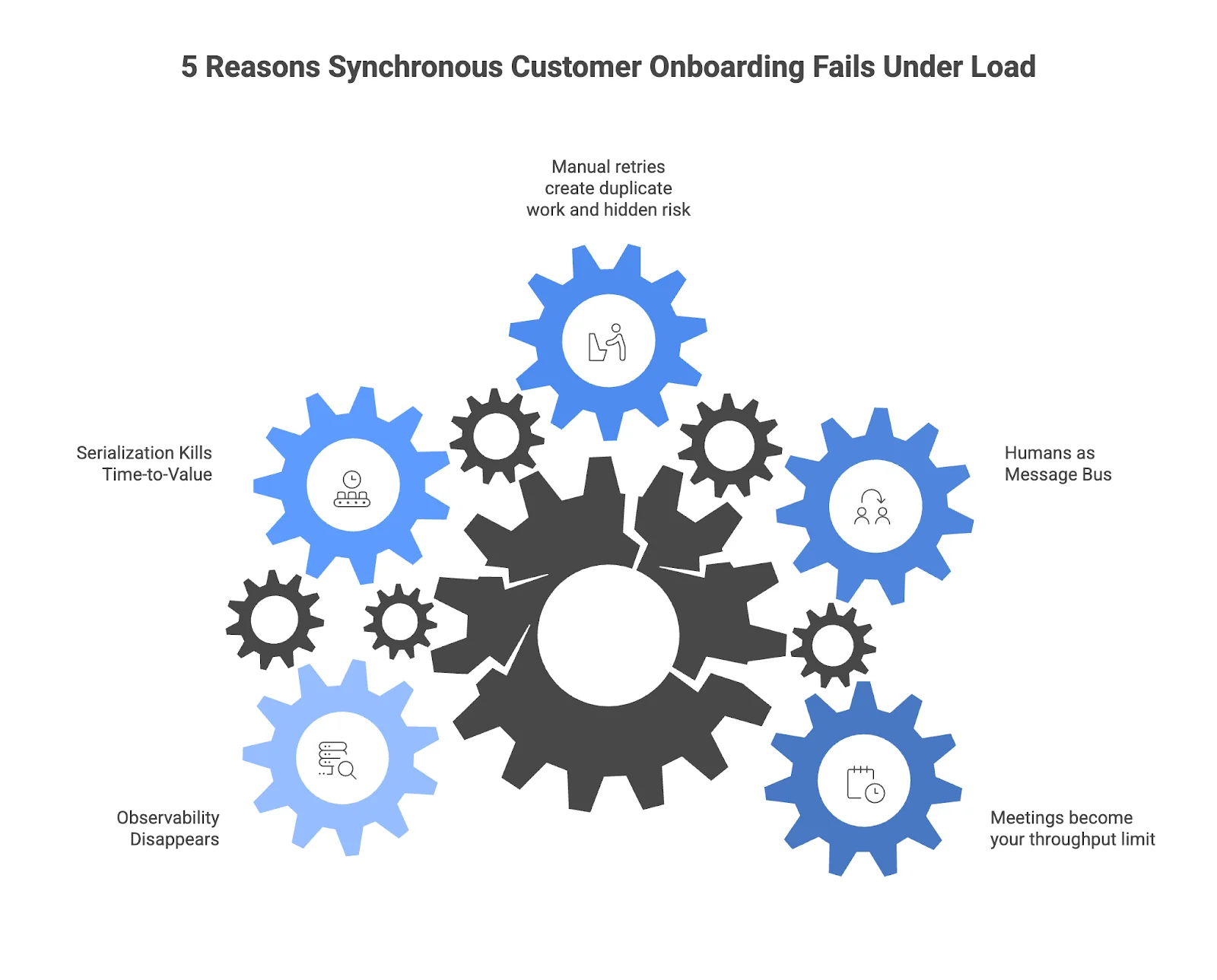
5 Reasons Synchronous Customer Onboarding Fails Under Load
1. Meetings become your throughput limit
Every live session consumes the scarcest resource in the system: coordinated time. Once your pipeline grows, onboarding quality is no longer capped by engineering effort or product readiness. It is capped by who can get on a call next Tuesday.
That creates artificial backpressure. The customer may be ready. Your systems may be ready. But the process waits anyway.
2. Humans become the message bus
In a synchronous model, people carry state between systems. Someone says the sandbox is ready. Someone else remembers that SSO metadata is still missing. A third person sends the follow-up after the call.
This works for a while because smart people patch the gaps. But it does not scale reliably. When humans become the message bus, onboarding state fragments across tools, and every handoff becomes a potential failure point.
3. Manual retries create duplicate work and hidden risk
External systems fail. APIs timeout. Customers upload the wrong file. Approvals get delayed. None of that is unusual.
What matters is how the system recovers. In synchronous onboarding, recovery is often manual: another email, another ping, another meeting, another spreadsheet update. That is slow, inconsistent, and risky. It also makes idempotency somebody’s memory instead of a system guarantee.
4. Serialization kills time-to-value
A lot of onboarding work does not need to happen live or even in strict sequence. Provisioning can start while documentation is reviewed. Access checks can run while the customer completes configuration. Reminders can be event-driven instead of manually scheduled.
Synchronous onboarding forces too much of that work into a serialized path. The result is longer lead times, slower activation, and a worse customer experience even when everyone involved is competent and responsive.
5. Observability disappears
At scale, the most expensive question is often the simplest one: “What is the status of this onboarding?”
If the answer requires digging through notes, asking multiple teams, or replaying the last three calls, you do not have an onboarding system. You have a set of conversations pretending to be one.
Customer Onboarding Automation Needs Workflow Orchestration
This is where many teams choose the wrong fix. They add more templates, more reminders, more customer success tooling, or more dashboards.
Those can help, but they do not solve the core issue. Customer onboarding at scale is not just a communication problem. It is an orchestration problem.
Automation handles individual tasks. Workflow orchestration coordinates the entire journey: the order of steps, the dependencies, the retries, the waiting, the escalations, and the current state. That distinction matters because onboarding is rarely linear. It is event-driven, long-running, and often human-in-the-loop.
A kickoff call can still exist. But it should be one step in the workflow, not the workflow itself.
SCALING CUSTOMER ONBOARDING WITH TEMPORAL?Onboarding breaks when meetings, reminders, spreadsheets, and Slack threads become the system of record. Xgrid’s Temporal workflows whitepaper shows how durable execution helps teams coordinate long waits, retries, approvals, provisioning, and customer-side dependencies across thousands of long-running workflows. |
How Temporal Improves Long-Running Customer Onboarding Workflows
Temporal is a strong fit for this exact class of problem. It describes customer onboarding as a mission-critical workflow use case and defines a Workflow Execution as a durable, reliable, and scalable unit of execution that can survive crashes, network failures, and infrastructure outages. Temporal also explicitly calls out human-in-the-loop systems, including customer onboarding, as event-driven flows that are difficult to implement reliably with ad hoc code.
That matters because onboarding is usually long-running. It can wait hours, days, or weeks for a customer action, a legal review, an SSO handoff, or a downstream system to recover. Temporal lets workflows pause and resume durably instead of forcing you to rebuild state from logs, queues, or custom retry logic. Its message model supports Signals, Queries, and Updates so workflows can react to external events, expose current state, and accept controlled changes while they are running.
A practical mapping looks like this:
| Onboarding need | Temporal building block | Why it fits |
| Provision a sandbox or import data | Activity | Encapsulates side effects and external calls |
| Wait for SSO metadata or customer confirmation | Signal / Update | Event-driven state changes without polling |
| Break out security review or migration | Child Workflow | Keeps complex sub-processes isolated and composable |
| Send reminders after delays | Timer | Native waiting without cron glue |
| Show current onboarding status | Query | Real-time visibility into workflow state |
| Keep long-running onboardings healthy | Continue-As-New | Prevents large histories from becoming a burden |
Activities are especially useful for the messy edges of onboarding: provisioning environments, sending emails, calling third-party APIs, running imports, or validating configuration. Temporal documents retries, timeouts, and failure handling for Activities, and it notes that Activities are associated with retry policies by default. For larger onboarding programs, Child Workflows help compose sub-processes, Continue-As-New keeps long-running workflows healthy, and versioning features matter because some onboardings outlive your deployment cadence.
Just as important, Temporal gives you a durable event history and runtime state model instead of scattered operational breadcrumbs. That means support, engineering, and onboarding teams can inspect what happened, what is waiting, and what failed without reverse-engineering the process from chat logs.
A Practical Customer Onboarding Workflow Architecture
If you are designing customer onboarding automation with Temporal, a solid pattern is:
- 1. Start the onboarding workflow when the deal closes.
Contract signed, order created, or account approved should be a workflow trigger, not an email. - 2. Fan out parallel setup tasks early.
Create workspaces, provision environments, validate integrations, and generate onboarding checklists in parallel where possible. - 3. Model human actions as events, not meetings.
Customer uploads a file. Security approves access. Legal clears language. Admin confirms DNS. These are state transitions. - 4. Use retries and timeouts around external dependencies.
Treat flaky APIs, delayed approvals, and intermittent services as normal operating conditions. - 5. Expose workflow state everywhere it matters.
Internal dashboards, customer portals, Slack alerts, and support views should all read from the same workflow state. - 6. Escalate live only when ambiguity is high.
Use people for judgment, design decisions, and complex exceptions, not for carrying routine state forward.
This architecture changes the goal of onboarding. Instead of coordinating people around the process, you coordinate the process around reality.
Production readiness checklist for customer onboarding automation
Before shipping a Temporal-backed onboarding workflow, confirm:
- Customer actions, approvals, and document uploads are modeled as events, not manual follow-ups
- Provisioning, imports, notifications, and external API calls run as retryable activities
- Long waits use timers, signals, or updates instead of cron jobs or polling
- Search Attributes expose customer ID, onboarding stage, owner, status, and blocker reason
- Dashboards show where each onboarding is stuck without requiring Slack or email archaeology
Where Live Customer Onboarding Still Matters
None of this means live onboarding should disappear.
Real-time conversations still matter for solution design, executive alignment, security deep dives, change management, and escalations. Some customers genuinely move faster when a call forces focus and commitment.
But those calls should add value, not transport state.
That is the mental shift. Meetings should resolve ambiguity, not act as your workflow engine. The workflow engine should already know what is complete, what is blocked, what timed out, and what comes next.
Frequently asked questions about customer onboarding automation
What is customer onboarding automation?
Customer onboarding automation uses workflow-driven systems to coordinate provisioning, approvals, integrations, reminders, and customer actions.
The goal is to reduce manual follow-ups while keeping humans focused on judgment, exceptions, and high-value customer conversations.
Why does synchronous customer onboarding break at scale?
Synchronous onboarding breaks when meetings, emails, Slack threads, and manual reminders become the control plane for customer progress.
As volume grows, state fragments across tools, handoffs slow down, and teams lose visibility into where each customer is blocked.
How does Temporal help automate customer onboarding?
Temporal helps model onboarding as a long-running workflow that can wait, retry, recover, and expose current state across teams.
It supports activities, signals, timers, queries, child workflows, and Continue-As-New for durable onboarding processes that may run for days or weeks.
Should live onboarding calls still be part of the process?
Yes. Live calls are still useful for solution design, executive alignment, security reviews, and complex exceptions.
They should resolve ambiguity, not carry routine workflow state that a durable onboarding system should already know.
Build Reliable Customer Onboarding at Scale with Xgrid
If your onboarding process still depends on Slack reminders, spreadsheets, cron jobs, ticket hopping, and people remembering the next step, you are already operating a distributed system. It is just one without the durability, observability, or control you would expect from any other production workflow.
Xgrid helps teams design and implement Temporal-based workflow orchestration for long-running, human-in-the-loop processes like customer onboarding, provisioning, approvals, and post-sale activation.
We are also offering a free workflow review for teams that want to understand where synchronous customer onboarding is creating operational drag. We will map your current onboarding flow, identify the failure points, and show where durable execution, retries, state visibility, and event-driven orchestration can reduce time-to-value without adding more operational overhead.
Related Temporal workflow orchestration guides
- For heartbeats, signal handling, Continue-As-New, and multi-day workflow design, read: Long-Running Temporal Workflows in Production
- For Search Attributes, stuck workflow detection, and shared operational visibility, read: Temporal Observability in Production Guide
- For durable execution, retries, versioning, scaling, and enterprise workflow architecture, read: Building Enterprise-Grade Workflows with Temporal
- For the risks of running onboarding logic through cron jobs, DB flags, and ad-hoc retries, read: The Hidden Cost of Home-Grown Workflow Orchestration
Related Articles

Related Articles

Established in 2012, Xgrid has a history of delivering a wide range of intelligent and secure cloud infrastructure, user interface and user experience solutions. Our strength lies in our team and its ability to deliver end-to-end solutions using cutting edge technologies.
NAVIGATE
Cloud & DevOps Web & Mobile Apps Temporal Digital Marketing GTM Engineering Marketo Consulting HubSpot Consulting Company Careers ResourcesOFFICE ADDRESS
US Address:
Plug and Play Tech Center, 440 N Wolfe Rd, Sunnyvale, CA 94085
Dubai Address:
Dubai Silicon Oasis, DDP, Building A1, Dubai, United Arab Emirates
Pakistan Address:
Xgrid Solutions (Private) Limited, Bldg 96, GCC-11, Civic Center, Gulberg Greens, Islamabad
Xgrid Solutions (Pvt) Ltd, Daftarkhwan (One), Building #254/1, Sector G, Phase 5, DHA, Lahore
Xgrid © 2026. All rights reserved.