
Batching vs. Single-Activity Workflows in Temporal: When to Use signalWithStart and Continue-As-New


Why high-volume single-activity workflows are quietly one of the most expensive Temporal patterns — and the batching primitives that fix it
|
TL;DR Temporal charges per action. Every workflow execution — no matter how simple — generates at minimum 6 billable actions just for starting, scheduling, and completing. When a workflow type runs hundreds of thousands of times per month with only one or two activities, most of that action cost is pure orchestration overhead with no business value. The fix is batching: one long-running queue workflow processes many work items via signals, using Continue-As-New to keep history bounded. This post explains when to batch, when not to, and how to decide using a concrete decision framework. |
The Hidden Cost of Convenience: Single-Activity Workflows at Scale
Single-activity workflows are the most natural Temporal pattern for teams getting started. One workflow, one activity, one unit of work. Clean, simple, testable. And for low-to-moderate volume, entirely reasonable.
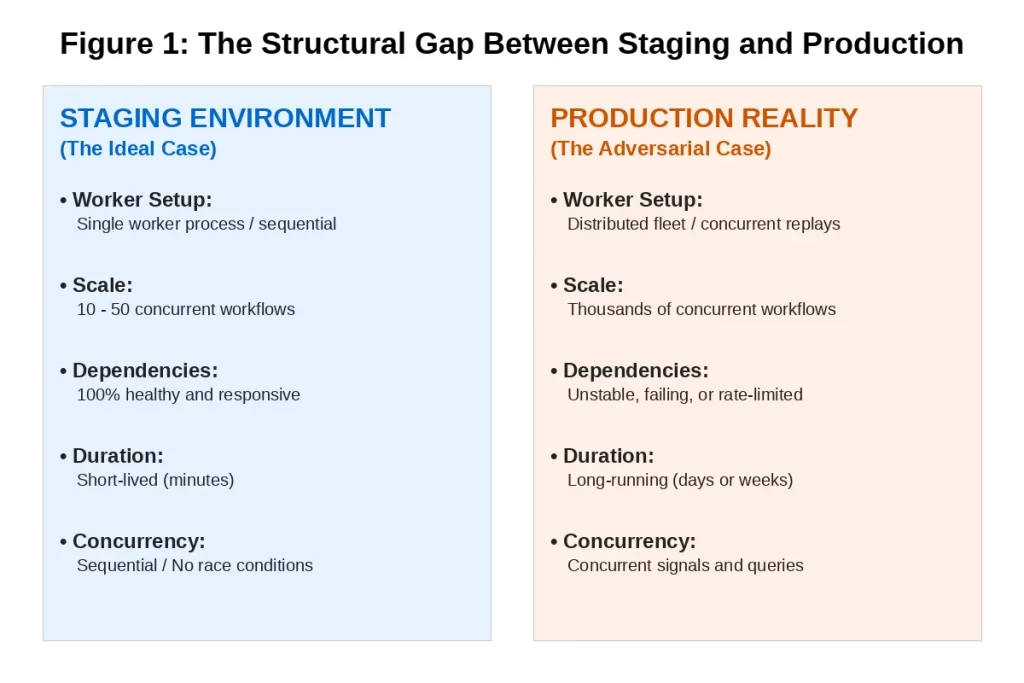
The problem surfaces when those workflow types begin running at high volume. Temporal charges per action, and every workflow execution — regardless of how simple — generates a fixed set of actions: workflow started, workflow task scheduled, workflow task started, activity scheduled, activity started, activity completed, workflow completed. That is a minimum of 6 to 7 billable actions per execution before any business logic runs.
For a workflow type running 200,000 times per month with a single activity, that is 1.2 million actions per month from overhead alone. The business logic itself might represent fewer than 200,000 of those actions. The rest is the cost of starting and stopping a workflow for each individual unit of work.
|
The Scale Multiplier The single-activity pattern is not wrong at low volume. It becomes wrong when the per-execution overhead dominates the total action cost. The threshold varies by billing tier, but in production audits the pattern consistently shows up as a primary cost driver when a workflow type exceeds roughly 50,000 executions per month with 1–2 activities per run. |
What Batching Actually Means in Temporal
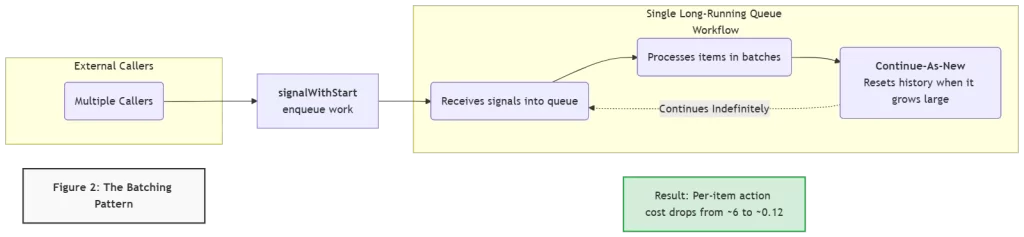
Batching in Temporal does not mean running multiple workflow instances in parallel. It means consolidating many units of work into a single long-running workflow instance that processes them as a stream. The two primitives that make this work are signalWithStart and Continue-As-New.
signalWithStart: The Enqueue Primitive
signalWithStart is a single API call that does two things atomically: if a workflow with the specified ID is already running, it sends a signal to that workflow. If no such workflow is running, it starts one and then sends the signal. This makes it the natural mechanism for enqueuing work into a persistent queue workflow without risking duplicate starts or missed signals.
The calling pattern is simple from the caller’s perspective: instead of starting a new workflow for each unit of work, callers call signalWithStart on a named singleton workflow. The complexity of the queue is entirely encapsulated inside the workflow. External APIs, event consumers, and scheduled jobs do not need to know whether the queue workflow is running or starting fresh.
Continue-As-New: The History Management Primitive
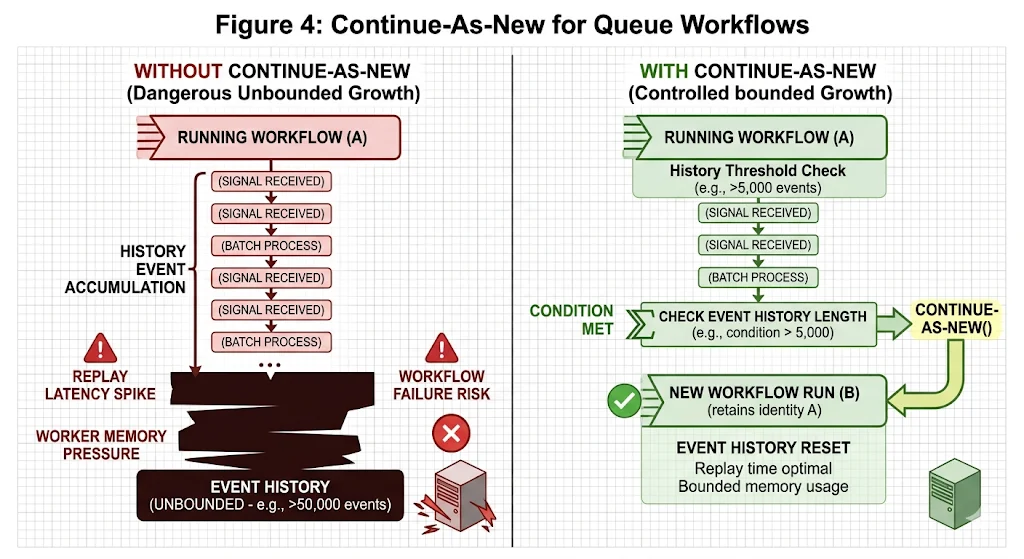
A long-running workflow that processes thousands of work items over days or weeks will accumulate a very large event history. Temporal replays this history on every worker restart. A history with hundreds of thousands of events takes significant time and memory to replay, creating latency and resource pressure that grows unbounded over the workflow’s lifetime.
Continue-As-New solves this by allowing a workflow to complete itself and immediately start a new run with the same workflow ID, passing its current state as the input to the new run. From the outside, the workflow appears to run continuously. From the inside, history is periodically reset, keeping replay fast and memory usage bounded.
|
The Action Math A single-activity workflow processing 50 items individually: 50 executions × 6 actions = 300 actions. A batched queue workflow processing those same 50 items in one batch: 1 execution × ~6 actions = 6 actions. For the same business work: 300 actions vs 6 actions. At high volume, this difference is the primary lever for reducing Temporal Cloud costs without changing any business logic. |
When to Batch and When Not To: A Decision Framework
Batching is not always the right answer. It changes the caller contract, requires idempotent operations, and introduces queue semantics that not every workflow type can absorb. Before switching any workflow type to the batching pattern, four questions need honest answers.
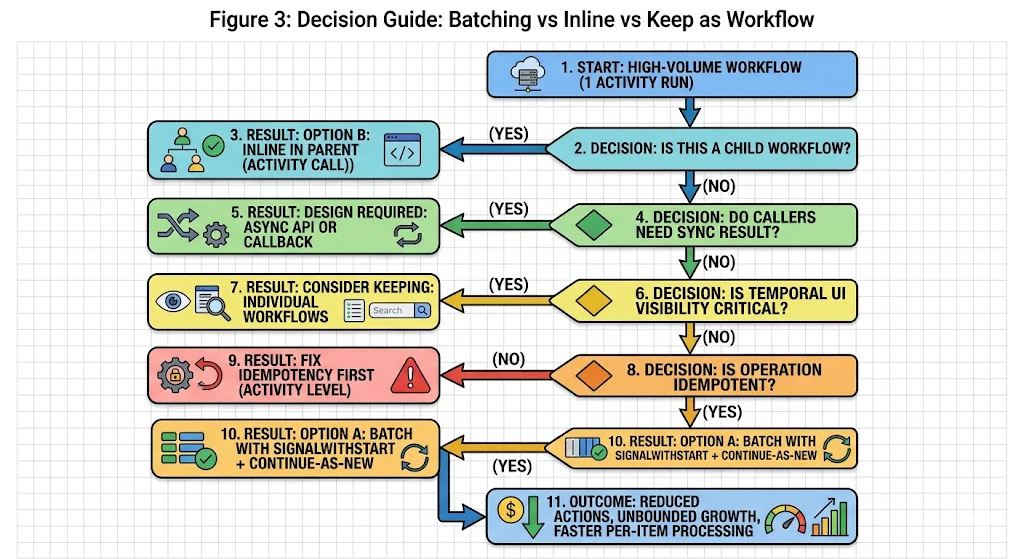
Question 1: Is this a child workflow?
If the high-volume workflow is started as a child of another workflow, the lowest-effort optimization is to replace the child workflow with a direct activity call in the parent. This eliminates the child workflow’s per-execution overhead without changing any external caller contracts. This is Option B: inline in parent.
This applies only when a parent workflow exists. For workflows started directly by external callers — APIs, event consumers, schedulers — Option B is not applicable.
Question 2: Do callers need a synchronous result?
The batching pattern is fundamentally asynchronous. A caller sends a signal and moves on. If any caller currently blocks on the result of the workflow in the same HTTP request or transaction, switching to signalWithStart breaks that contract. The caller would need an async API — a polling endpoint, a callback, or a separate query mechanism — to retrieve the result.
This is not a reason to avoid batching. It is a reason to design the async API before switching the workflow pattern. Attempting to batch a synchronous workflow without the async result retrieval mechanism in place is the most common way teams create regressions when optimizing.
Question 3: Is the operation idempotent?
The batching pattern relies on Temporal’s at-least-once activity execution semantics. An activity in a batched workflow may be retried if the worker crashes mid-batch. If the activity is not idempotent — if running it twice on the same item produces a different or duplicated result — retries will introduce data inconsistencies.
Idempotency is a prerequisite for batching, not an optional enhancement. If the underlying operation is not currently idempotent, add idempotency at the activity level before introducing the batching pattern.
Question 4: Is Temporal UI visibility critical for individual items?
Individual workflow executions are individually visible and queryable in the Temporal UI. A batched queue workflow shows as a single long-running execution. If the operations team currently uses the Temporal UI to track the status of individual items — individual invoices, individual account updates, individual contact saves — batching makes those items invisible at the individual level.
The mitigation is custom search attributes on the queue workflow, combined with structured activity-level logging. This preserves observability but requires deliberate instrumentation. If individual-item visibility in the Temporal UI is non-negotiable and cannot be replicated through other means, keep individual workflows but consider adding search attributes to improve query performance.
Continue-As-New: Getting the Details Right
Continue-As-New is simple in concept and has a few operational details that matter in practice.
When to Trigger It
The correct trigger for Continue-As-New in a queue workflow is history length, not time. Use workflow.GetInfo(ctx).GetCurrentHistoryLength() and trigger Continue-As-New when it exceeds a threshold — typically between 2,000 and 5,000 events depending on your average event size. Triggering on time or on item count can produce large histories if items are large, or unnecessary transitions if items are small.
What State to Pass Through
When Continue-As-New fires, the new workflow run starts fresh with only the state you explicitly pass as its input. Any work items that were buffered in-memory in the previous run must be passed through — either as part of the new run’s input, or by ensuring they were already written to an external store before Continue-As-New is called. Dropping buffered items on a Continue-As-New transition is the most common bug in queue workflow implementations.
The Workflow ID Is Preserved
This is the key property that makes Continue-As-New suitable for singleton queue workflows. The workflow ID does not change across Continue-As-New transitions. signalWithStart callers using the same workflow ID will still reach the correct workflow after a Continue-As-New. The continuity of the queue is transparent to callers.
Real-World Action Cost: What the Numbers Look Like
The table below shows real workflow types and their action volumes from a production audit, alongside the projected impact of switching to the batching pattern. The workflow names have been generalized but the volume and pattern data reflect actual production findings.
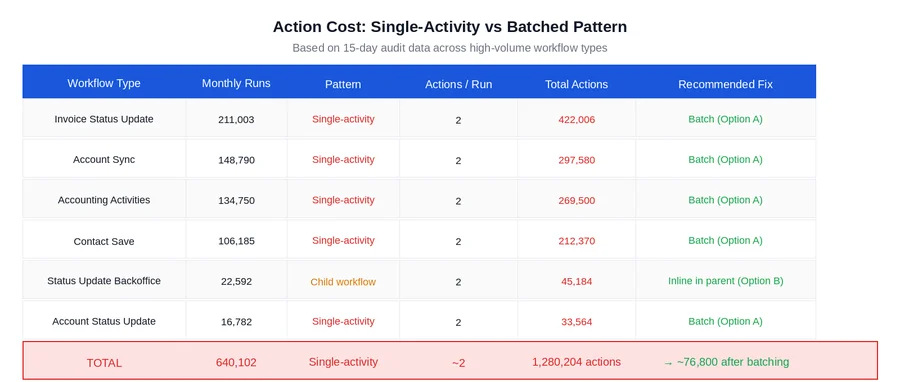
A few observations from these numbers worth calling out explicitly:
- The action reduction is a direct function of batch size. A batch size of 50 produces roughly a 50x reduction in actions for workflows that previously ran one item per execution. A batch size of 100 produces roughly a 100x reduction. The right batch size depends on item size, activity duration, and acceptable latency for individual items to be processed.
- Not all of these workflow types are straightforward to batch. The decision framework in Figure 3 applies to each one individually. Some will require an async API design before batching is possible. Some are child workflows that are better handled by Option B. The numbers show the potential; the decision framework determines what is actually achievable.
- The projected saving assumes idempotency is already in place. For any workflow type where the activity is not currently idempotent, the engineering cost of adding idempotency must be factored into the overall effort estimate.
What to Check Before Switching Any Workflow to Batching
The switch to a batching pattern is not reversible without another deployment. Before committing, verify the following:
- Activity idempotency is confirmed and tested. Run the activity twice with the same input in a test environment and verify the output is identical and no duplicate side effects occur.
- The caller contract change is handled. Any caller that currently blocks on a workflow result has been updated to use the async result retrieval pattern, or the batch workflow has been explicitly designed to support synchronous result polling via a query.
- Continue-As-New state transfer is tested. Deliberately trigger a Continue-As-New transition in a staging environment with buffered items in the queue and verify that none are dropped across the transition.
- Worker capacity is sized for the batched pattern. A batched queue workflow runs continuously rather than completing quickly. Verify that worker slot availability accounts for long-running queue workflows occupying slots alongside regular workflows.
- Observability is in place before launch. Custom search attributes, activity-level logging, and alerts on queue depth and batch processing latency should be live before the first production batch runs.
Closing Thoughts
The single-activity workflow pattern is not a mistake. It is the right choice at low volume, for operations that require individual-item visibility, and for workflows where the caller needs a synchronous result and an async API is not feasible. Knowing when it becomes the wrong choice — and having the decision framework to recognize that moment — is what keeps action costs from compounding quietly over months.
signalWithStart and Continue-As-New are the two Temporal primitives that make the batching pattern work correctly at production scale. They are not complex to implement. The complexity is in the prerequisites: idempotency, async caller contracts, and bounded history management. Teams that address those prerequisites before implementing the pattern ship it cleanly. Teams that skip them discover the gaps through production incidents.
If your Temporal Cloud bill has grown faster than your workflow volume, and a significant portion of your workflow types are high-volume with one or two activities per run, the batching pattern is likely the highest-leverage optimization available without any change to business logic.
Is your team still the bottleneck for figuring out which workflows to batch?
If the answer to “which of our workflow types should be batched and which should stay as-is?” still requires an engineering investigation rather than a structured framework — that gap compounds with every new workflow type added.
Xgrid offers two entry points depending on where you are:
- Temporal 90-Day Production Health Check — we audit your current workflow types against the decision framework above, identify which are candidates for batching vs inlining vs keeping, and give you a prioritized implementation plan with projected action savings per workflow type.
- Temporal Reliability Partner — for teams that want a named Temporal expert embedded long-term to review new workflow designs before they go live, ensuring batching and cost optimization decisions are made at design time rather than after the bill arrives.
Both are fixed-scope. No open-ended retainer required to get started.
Related Articles

Related Articles

Established in 2012, Xgrid has a history of delivering a wide range of intelligent and secure cloud infrastructure, user interface and user experience solutions. Our strength lies in our team and its ability to deliver end-to-end solutions using cutting edge technologies.
NAVIGATE
Cloud & DevOps Web & Mobile Apps Temporal Digital Marketing GTM Engineering Marketo Consulting HubSpot Consulting Company Careers ResourcesOFFICE ADDRESS
US Address:
Plug and Play Tech Center, 440 N Wolfe Rd, Sunnyvale, CA 94085
Dubai Address:
Dubai Silicon Oasis, DDP, Building A1, Dubai, United Arab Emirates
Pakistan Address:
Xgrid Solutions (Private) Limited, Bldg 96, GCC-11, Civic Center, Gulberg Greens, Islamabad
Xgrid Solutions (Pvt) Ltd, Daftarkhwan (One), Building #254/1, Sector G, Phase 5, DHA, Lahore
Xgrid © 2026. All rights reserved.