
Workflows as Coordinators, Not Carriers: How Oversized Payloads Silently Inflate Your Temporal Bill


Why passing full data objects through Temporal workflow history is one of the most common — and most fixable — sources of runaway cloud spend
| TL;DR
Temporal’s event history is a durability log, not a data store. When workflows pass full object graphs, row lists, or API responses through their history instead of storing data in your own database and passing a reference, two costs grow simultaneously: active storage during execution, and retained storage for every hour of your retention window after the workflow closes. This post explains exactly why this pattern emerges, what it costs, and the single architectural rule that eliminates it — with diagrams to make the pattern and the fix immediately visible. |
The Billing Surprise That Looks Like a Scale Problem
When engineering teams see their Temporal Cloud bill growing faster than their workflow volume, the first instinct is to look at actions. Actions are the most visible billing dimension — they appear as a count in the dashboard and they scale directly with how many workflows you run.
But in many production environments we audit, the primary cost growth driver is not actions. It is retained storage: the accumulated cost of keeping workflow event histories for the configured retention window. And the root cause of that storage growth is almost never the number of workflows. It is the size of each workflow’s event history.
A workflow that passes a 500KB payload through its history costs roughly 125 times more in retained storage than a workflow that passes a 4KB summary of the same operation. At moderate workflow volume and a 15-day retention policy, that difference compounds into hundreds of dollars per month from a single workflow type — without any corresponding increase in business value delivered.
| The Core Problem
Temporal’s event history is designed to store execution state: what steps were taken, in what order, with what outcomes. It is not designed to store business data. When workflows carry full data objects through their history instead of references to data stored elsewhere, they are using an expensive durability log as a cheap data bus. The cost is neither cheap nor immediate — it accumulates silently until someone opens the billing dashboard. |
Coordinator vs Carrier: What the Difference Looks Like
The distinction between a workflow as coordinator and a workflow as carrier is architectural, not syntactic. It is not about how the code is written — it is about what is placed in the workflow’s inputs, outputs, and activity arguments, and therefore what gets permanently written to the event history.
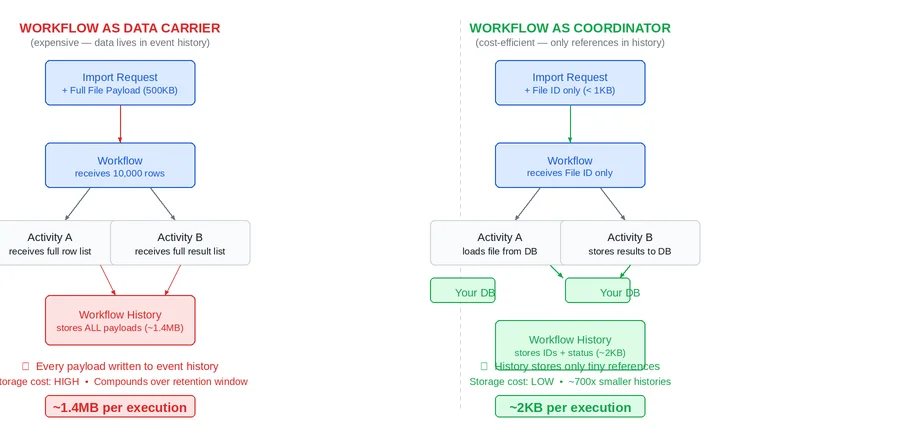
The diagram below shows the same import processing operation implemented both ways. Every rounded box represents data that gets written into the workflow’s event history. In the carrier pattern on the left, that includes the full row dataset — twice. In the coordinator pattern on the right, the history records only a file ID going in and a count coming out.
What Gets Written to Event History and Why It Matters
Every time a workflow calls an activity, Temporal records four events in the history: the activity scheduled event (which includes the input payload), the activity started event, the activity completed event (which includes the output payload), and the subsequent workflow task. This means every payload passed into or out of an activity is permanently stored in the event history for the duration of the retention window after the workflow closes.
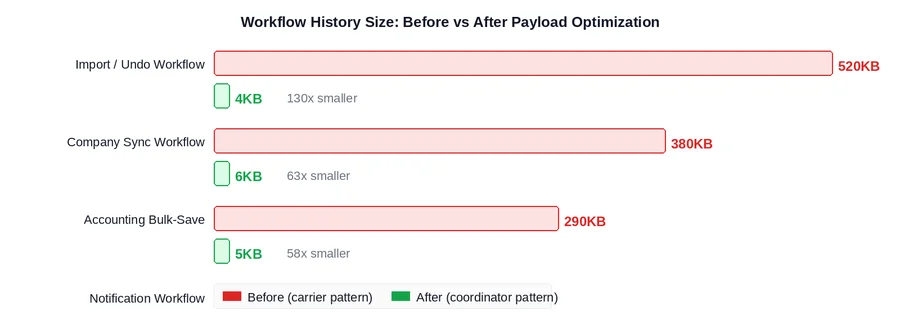
In the carrier pattern, a workflow processing 10,000 import rows might accumulate over 1.4MB of event history for a single execution. In the coordinator pattern, the identical business operation produces approximately 2KB of history. The ratio is consistent across workflow types that exhibit this pattern: 50x to 700x smaller histories when the coordinator pattern is applied correctly.
| The 700x Difference
1.4MB vs 2KB is not an edge case. It is the typical ratio observed when auditing production Temporal environments where the carrier pattern has been applied to batch processing, data sync, or bulk-save workflows. At 10,000 workflow executions per month and a 15-day retention policy, that ratio translates directly into a significant and entirely avoidable monthly storage cost from a single workflow type. |
Why the Cost Compounds: The Retention Multiplier
The reason payload size matters so much for billing is Temporal’s retained storage model. Storage is charged in GB-hours, not as a snapshot. A closed workflow’s history sits in retained storage for every hour of the configured retention window after it closes, accumulating charges continuously until the retention period expires.
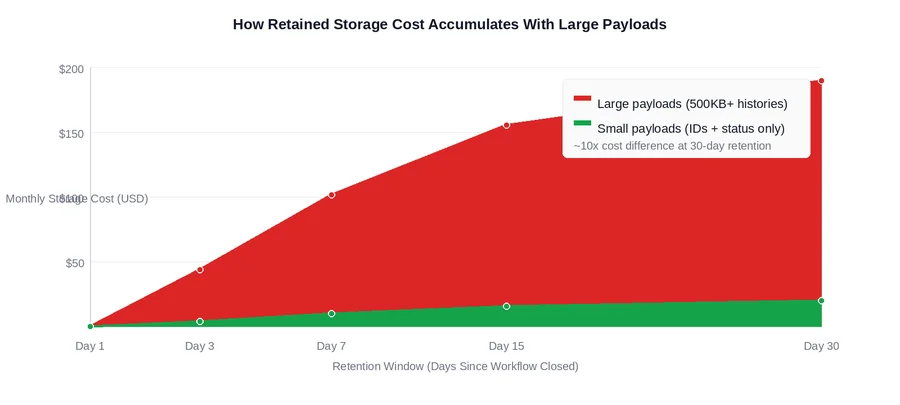
The practical implication: reducing payload size and reducing retention days are multiplicative optimizations. Halving payload size AND halving retention from 30 days to 15 days produces a 4x reduction in retained storage cost — not a 2x reduction. They compound because both affect GB-hours from different directions simultaneously.
An important operational detail: changing the retention policy only affects workflows that close after the policy change. Workflows that closed under the old policy continue accumulating charges until their original retention period expires. This means the savings from a retention change are gradual, while the savings from a payload size reduction are immediate and apply to every new workflow execution from the point of deployment.
The Pointer Pattern: One Rule That Fixes It
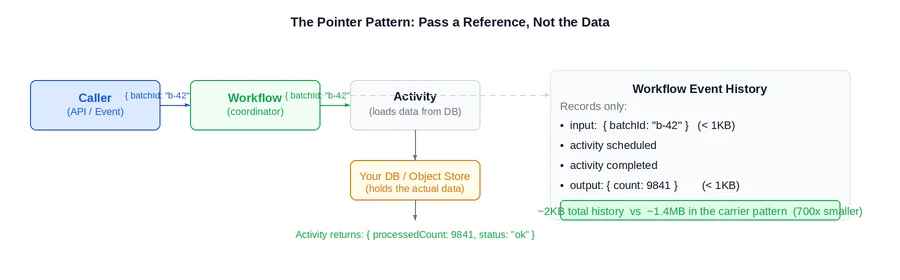
The fix for the carrier anti-pattern is a single architectural rule applied consistently: pass a pointer, not the box. Workflow inputs, activity inputs, and activity outputs should contain identifiers, counts, status codes, and small summaries. The actual data should live in the system of record — a database, object storage, or cache — and be loaded directly by the activity that needs it.
What Changes in Practice
Applying the pointer pattern means changing the contract between workflows and activities in three specific ways:
- Activity inputs shrink from full objects to identifiers. Instead of passing a list of company records into an activity, pass a batch ID or a list of IDs. The activity fetches the records from the database when it runs. The workflow history records the ID — not the data.
- Activity outputs shrink from full results to summaries. Instead of returning a list of processed records, return a count, a status, and a reference to where the full results were stored. The workflow records this summary in its history — not the payload.
- Activities become responsible for their own data loading. This is the architecturally correct design: an activity that needs data should load it from the system of record. A workflow that ferries data between activities is taking on a responsibility that belongs downstream.
This change requires modifying activity internals to fetch inputs from the system of record rather than receiving them as parameters. For teams with an established data access layer, this is typically a small refactor. For teams where activities receive data exclusively from their callers, it requires more careful planning — but the architectural improvement extends well beyond the billing impact.
SEEING TEMPORAL STORAGE COSTS CLIMB?Oversized payloads are one of the easiest Temporal cost problems to miss because the workflow still works. The issue only becomes visible later, when event histories, retained storage, and retention windows start compounding across production volume. Xgrid’s Temporal practice helps teams identify cost drivers like payload size, retry storms, batching gaps, worker capacity, and observability blind spots, then redesign workflows around patterns like lightweight coordination before storage becomes a recurring tax. |
Which Workflow Types to Look at First
Not every workflow exhibits the carrier pattern. It concentrates in specific workflow categories. The strongest signals that a workflow is acting as a data carrier:
- The workflow receives a list or collection as its primary input
- An activity’s return value is a list or collection passed directly to the next activity
- The workflow type name contains words like ‘import’, ‘sync’, ‘bulk’, ‘batch’, or ‘save’
- The workflow’s average history size is significantly larger than its happy-path action count would suggest
The chart below shows what payload reduction looks like in practice across the workflow categories where this pattern most commonly appears, based on production audit findings:
Production readiness checklist for Temporal payload design and storage cost
Before shipping high-volume Temporal workflows to production, confirm:
- Activity inputs pass pointers such as batch IDs, file IDs, record IDs, or object storage keys
- Activity outputs return counts, statuses, summaries, or result references instead of full datasets
- Large payloads are stored in the system of record, not in Temporal Event History
- Import, sync, bulk-save, batch, and queue workflows are checked first for carrier-pattern behavior
- Retention settings are reviewed alongside payload size because both affect GB-hour storage cost
A Prioritized Rollout: Where to Start
Refactoring every workflow type to the coordinator pattern simultaneously is neither necessary nor advisable. The right approach sequences the work by impact: fix the workflows generating the most storage cost first, and evaluate more complex cases before committing to a refactor approach.
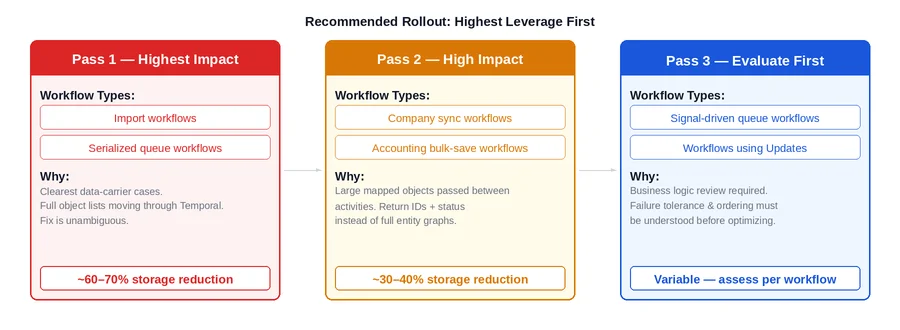
Pass 1: Clearest Cases, Highest Leverage
Import workflows and serialized queue workflows are almost always the correct starting point. The carrier anti-pattern is unambiguous in these: a batch of rows or records is loaded, passed through the workflow as a parameter, and ferried between activities. The fix is direct: store the batch in the database or object storage before starting the workflow, pass the batch ID to the workflow, and have each activity load what it needs. This pass typically produces the largest storage reduction per engineering hour invested.
Pass 2: High Impact, Slightly More Complex
Company sync and accounting bulk-save workflows exhibit the same pattern but with more complex object shapes: large maps, nested structures, full entity graphs. The fix is identical in principle — return IDs and status instead of full objects — but the activity refactoring requires more careful coordination with the data access layer, particularly where multiple activities currently share data by passing it through the workflow as a transient store.
Pass 3: Evaluate Before Optimizing
Queue workflows that use signals and any workflow using Temporal Updates require a business logic review before optimization decisions can be made. The data flow in these workflows is more complex, and the right approach — batching versus the pointer pattern versus workflow restructuring — depends on failure tolerance, ordering requirements, and whether callers need synchronous results. The rule here is straightforward: understand the business behavior before changing the data contract.
What This Does Not Fix
The coordinator pattern targets storage cost. Two other cost drivers require different interventions:
- Action cost from high-volume single-activity workflows. If a workflow type runs hundreds of thousands of times per month with one or two activities each, the dominant cost is per-execution action overhead, not payload size. The correct fix is batching: consolidate many units of work into a single long-running queue workflow using signalWithStart, rather than starting a separate workflow per unit. The coordinator pattern applied to an already-tiny payload produces negligible savings here.
- Action cost from retry storms. When a downstream dependency goes down and workflows retry their activities repeatedly, cost is driven by the volume of retry actions. The fix is retry policy tuning: higher backoff coefficients, hard attempt caps, and explicit non-retryable error types for business validation failures. Reducing payload size has no effect on action count.
Identifying which cost driver is dominant for each workflow type is the prerequisite for choosing the right optimization. Storage cost that is disproportionate to workflow volume points to the carrier pattern. Action count that is disproportionate to happy-path execution count points to retries or batching. Both can be present simultaneously in different workflow types within the same namespace.
Closing Thoughts
The carrier anti-pattern is one of the most common sources of avoidable Temporal Cloud spend in production environments, and one of the easiest to miss without deliberately looking for it. The event’s history grows quietly. Retained storage charges accumulate in the background between billing cycles. The bill climbs without any visible change in workflow failure rates or latency. By the time the pattern is noticed, months of charges have already accrued.
The fix is a single, consistently applied architectural rule: pass a pointer, not the box. Applied to the highest-impact workflow types first — import workflows, serialized queue workflows, bulk-save workflows — the storage reduction is immediate and significant. It does not require changing retention policies, plan tiers, or cluster configuration. It requires changing what goes into activity inputs and outputs, and moving data ownership back to the system of record where it belongs.
If it is not clear which workflow types are driving storage cost today, the fastest diagnostic is to examine average workflow history size by type in the Temporal Cloud metrics. Any workflow type with histories consistently above 50KB is a candidate worth investigating with the coordinator pattern in mind.
Frequently asked questions about Temporal payload optimization
Why do oversized payloads increase Temporal costs?
Temporal stores workflow inputs, activity inputs, activity outputs, and other execution events in Event History.
When workflows pass large objects or datasets through history, retained storage grows across every execution and every hour of the retention window.
What is the coordinator pattern in Temporal?
The coordinator pattern means workflows coordinate execution by passing IDs, references, statuses, and summaries instead of carrying full datasets.
Activities load the actual data from the system of record, which keeps workflow history small and reduces retained storage cost.
What data should you avoid passing through Temporal workflows?
Avoid passing full API responses, row lists, large object graphs, files, bulk records, or complete processed results through workflow history.
Store large data in a database, object storage, or cache, and pass a stable pointer such as a batch ID or file key instead.
How can teams reduce Temporal retained storage costs?
Teams can reduce retained storage by shrinking payloads, applying the pointer pattern, monitoring workflow history size, and reviewing retention settings.
The biggest gains usually come from high-volume import, sync, batch, queue, and bulk-save workflows that currently carry full datasets.
Is your team still guessing which workflows are driving your storage cost?
If the answer to “which workflow type is responsible for our retained storage growth?” requires an investigation rather than a dashboard glance — that’s a visibility gap worth closing.
Xgrid offers two entry points depending on where you are:
- Temporal 90-Day Production Health Check — we audit your current workflow designs against billing patterns including payload size, identify the carrier anti-pattern across your workflow types, and give you a prioritized fix list with estimated monthly savings per item.
- Temporal Reliability Partner — for teams that want a named Temporal expert embedded long-term to review new workflow designs before they go live, catching the carrier pattern and other cost and reliability issues before they reach production.
Both are fixed-scope. No open-ended retainer required to get started.
Related Temporal cost and production guides
- For high-volume workflow action costs and batching decisions, read: Temporal Batching vs Single Workflows: Cost Guide
- For retry storms, dependency outages, and action-count spikes, read: Temporal Retry Policies at Scale
- For payload sizing as part of production architecture, read: Temporal Workflow Production Readiness: 6 Architecture Decisions
- For monitoring workflow history, Search Attributes, and stuck executions, read: Temporal Observability in Production Guide
Related Articles

Related Articles

Established in 2012, Xgrid has a history of delivering a wide range of intelligent and secure cloud infrastructure, user interface and user experience solutions. Our strength lies in our team and its ability to deliver end-to-end solutions using cutting edge technologies.
NAVIGATE
Cloud & DevOps Web & Mobile Apps Temporal Digital Marketing GTM Engineering Marketo Consulting HubSpot Consulting Company Careers ResourcesOFFICE ADDRESS
US Address:
Plug and Play Tech Center, 440 N Wolfe Rd, Sunnyvale, CA 94085
Dubai Address:
Dubai Silicon Oasis, DDP, Building A1, Dubai, United Arab Emirates
Pakistan Address:
Xgrid Solutions (Private) Limited, Bldg 96, GCC-11, Civic Center, Gulberg Greens, Islamabad
Xgrid Solutions (Pvt) Ltd, Daftarkhwan (One), Building #254/1, Sector G, Phase 5, DHA, Lahore
Xgrid © 2026. All rights reserved.