
Multi-Agent System Observability with Temporal: How We Cut Cost 65% and Latency 70%
How durable execution turned a “slow model” mystery into a readable multi-agent timeline — and why usage budgets and a thinner tool API changed the unit economics.
Executive Summary
What We Learned
Happy-path runs finished in under a minute. A long tail burned tokens for several minutes and sometimes died with an opaque workflow error. Dashboards said workers were healthy. The model vendor said we were spending money. Neither answered the only question that mattered:
How many model turns did this run take — and which agent was still talking?
This is the story of re-engineering a multi-agent recommendation system so that cost policy lives in the orchestrator, trivial helpers are not agent tools, and Temporal is the single observability spine across worker, tools, and reviewer.
After that re-engineering, on the same shape of traffic:
- ~65% lower cost per successful result
- ~70% lower time to yield a result
- Failures that explain themselves instead of vanishing into “the model was slow”
No product names. No customer data. Just the architecture.
Key Learnings
- 01The problem: A worker agent was repeatedly making model requests and calling a trivial deterministic tool, driving up cost and latency.
- 02What exposed it: Temporal gave us a per-run history across the orchestrator, worker, tools, and reviewer.
- 03What we changed: We introduced per-agent usage budgets and removed deterministic helpers from the agent tool surface.
- 04The result: ~65% lower cost and ~70% lower latency per successful result.
Scaling Challenges
Why Multi-Agent Systems Hide Cost and Latency
We don’t run a chatbot. We run a pipeline of agents with a job: gather structured facts, recommend a version, and defend that recommendation under review.
- 01Orchestrator: cache, round policy, when to stop
- 02Worker agent: plans, calls tools, emits structured output
- 03Reviewer agent: scores consistency and phrasing; can send the worker back
Around that sit knowledge APIs, release metadata, deterministic helpers, retries, and timeouts.
Observability Gap
Why logs weren’t enough
When a run stretched, every layer had a partial story:
| Layer | What it showed | What it hid |
|---|---|---|
| App logs | Agent started, a tool returned | How many model turns, in what order |
| Model provider | Aggregate token spend | Which agent, which loop, which tool |
| Reviewer | Sometimes nothing | Whether the worker was still exploring or stuck |
| Intuition | “The model is slow” | Whether we had an architectural leak |
Failure mode here can take the form of the worker consuming the entire request budget, preventing the reviewer from starting and leaving the orchestrator with only a late exception.
The Runtime Foundation
Temporal as the observability spine
We re-engineered the runtime around Temporal, making workflow orchestration a first-class part of the system:
- The orchestrator is the workflow
- The worker is a durable pydantic-ai TemporalAgent
- The reviewer is its own activity
- Every model request and tool call is a Temporal activity
Exporting one workflow’s event history answered questions logs never could:
- How many worker model turns?
- Which tools, how often, with what arguments?
- Did the reviewer ever run?
- Where did wall-clock time actually go?
Unified execution tree
Workflow (orchestrator)
├── load context / cache
├── Worker agent run
│   ├── model_request              ← activity
│   ├── tool: knowledge check      ← activity
│   ├── tool: releases             ← activity
│   ├── tool: deterministic logic  ← activity
│   └── model_request → output     ← activity
├── Reviewer agent turn            ← activity
├── (optional) worker revision
└── cache / complete
History Evidence
What Temporal workflow history revealed
A healthy run was a short play: a handful of worker model turns, purposeful tools, then reviewer consensus. A pathological run looked like a different system:
| Signal in history | Meaning |
|---|---|
| ~50 model_request activities | Worker hit pydantic-ai’s default request_limit |
| Same trivial helper ~46 times, same arguments | Worker never moved to final structured output |
| Zero reviewer activities | The multi-agent path collapsed to a solo looping agent |
| ~87% of wall time in model activities | Cost and latency were the same bug |
The terminal message was blunt:
The next request would exceed the request_limit of 50
That is pydantic-ai’s default ceiling on model requests per agent.run() — a safety net, not a product SLA we had chosen. In a multi-agent design it is catastrophic: you pay for the loop and you never get the quality gate.
One model activity in that run lasted more than two minutes. Context grew from tens of kilobytes toward hundreds. We were not waiting on a database. We were buying turns for a button the model should not have had.
Re-Engineering 1
Per-agent budgets as part of the contract
Multi-agent systems need per-agent budgets the way services need rate limits.
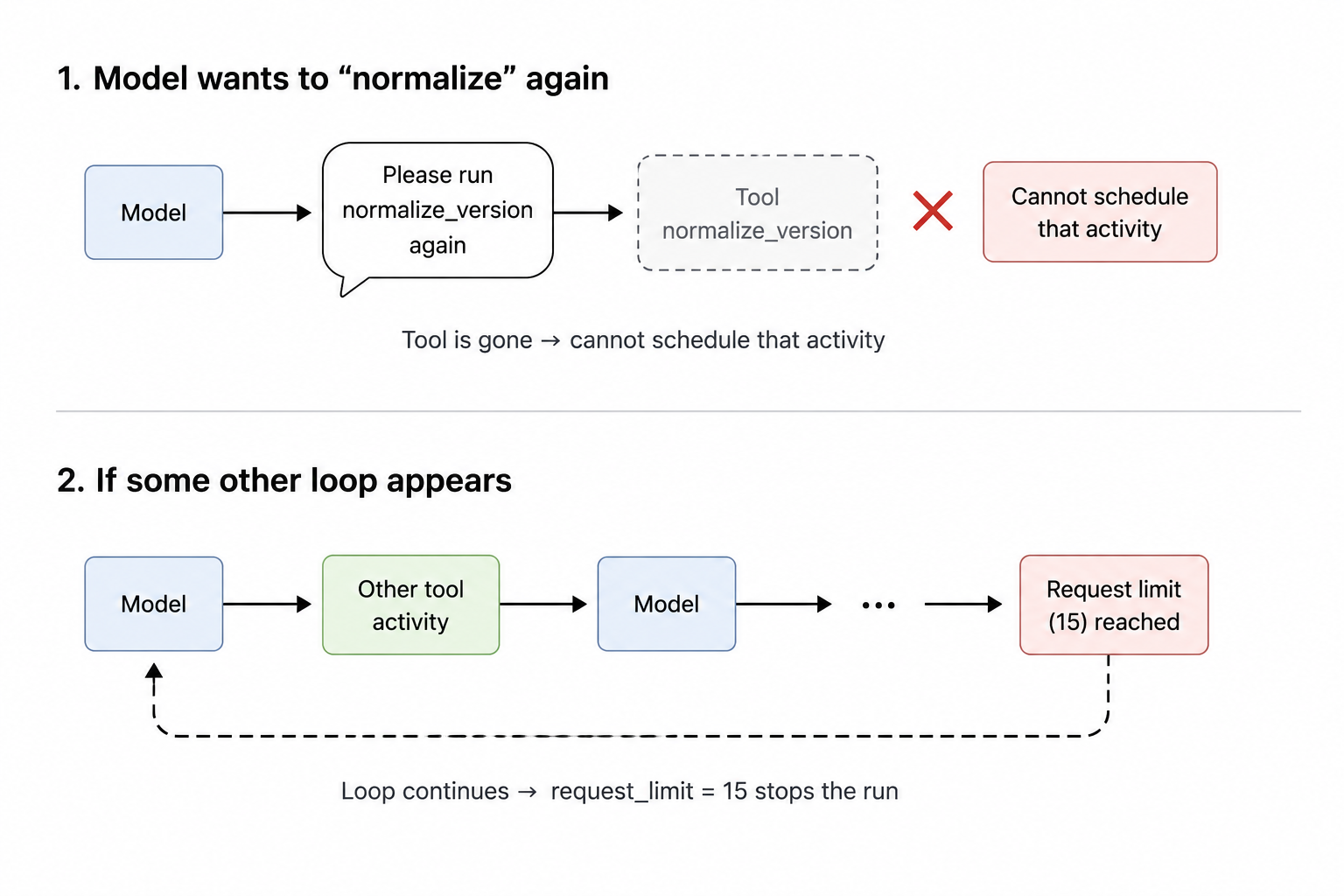
Healthy histories used on the order of six worker model turns. Pathological runs used fifty. We encoded that evidence in pydantic-ai UsageLimits on every run() — the boundary of one agent turn inside the orchestrator.
Important: apply limits directly to run(). Constructor-level limits on Agent(...) can be silently ineffective and create a subtle footgun.
from pydantic_ai.exceptions import UsageLimitExceeded
from pydantic_ai.usage import UsageLimits
from temporalio.exceptions import ApplicationError

# Derived from healthy histories (~6 turns)
WORKER_LIMITS = UsageLimits(
    request_limit=15,
    tool_calls_limit=20,
)

REVIEWER_LIMITS = UsageLimits(
    request_limit=5,    # scoring turn
    tool_calls_limit=0, # tool-free
)

async def run_worker_agent(prompt, *, deps, ...):
    try:
        return await worker_agent.run(
            prompt,
            deps=deps,
            usage_limits=WORKER_LIMITS,  # must be here
        )
    except UsageLimitExceeded as exc:
        raise ApplicationError(
            str(exc),
            type="WorkerLimitExceeded",
            non_retryable=True,  # fail fast
        ) from exc
Why both limits?
| Limit | What it guards |
|---|---|
| request_limit | Infinite model turns — exactly the failure we saw |
| tool_calls_limit | Tool thrash even while the model keeps “planning” |
In Temporal terms, exceeding the limit fails the agent run before another expensive model_request activity is scheduled. That is the difference between a four-minute autopsy and a fail-fast.
# Does not enforce the way teams expect
Agent(..., usage_limits=UsageLimits(request_limit=15))

# Enforces at the orchestrator boundary
await agent.run(..., usage_limits=UsageLimits(request_limit=15))
Re-Engineering 2
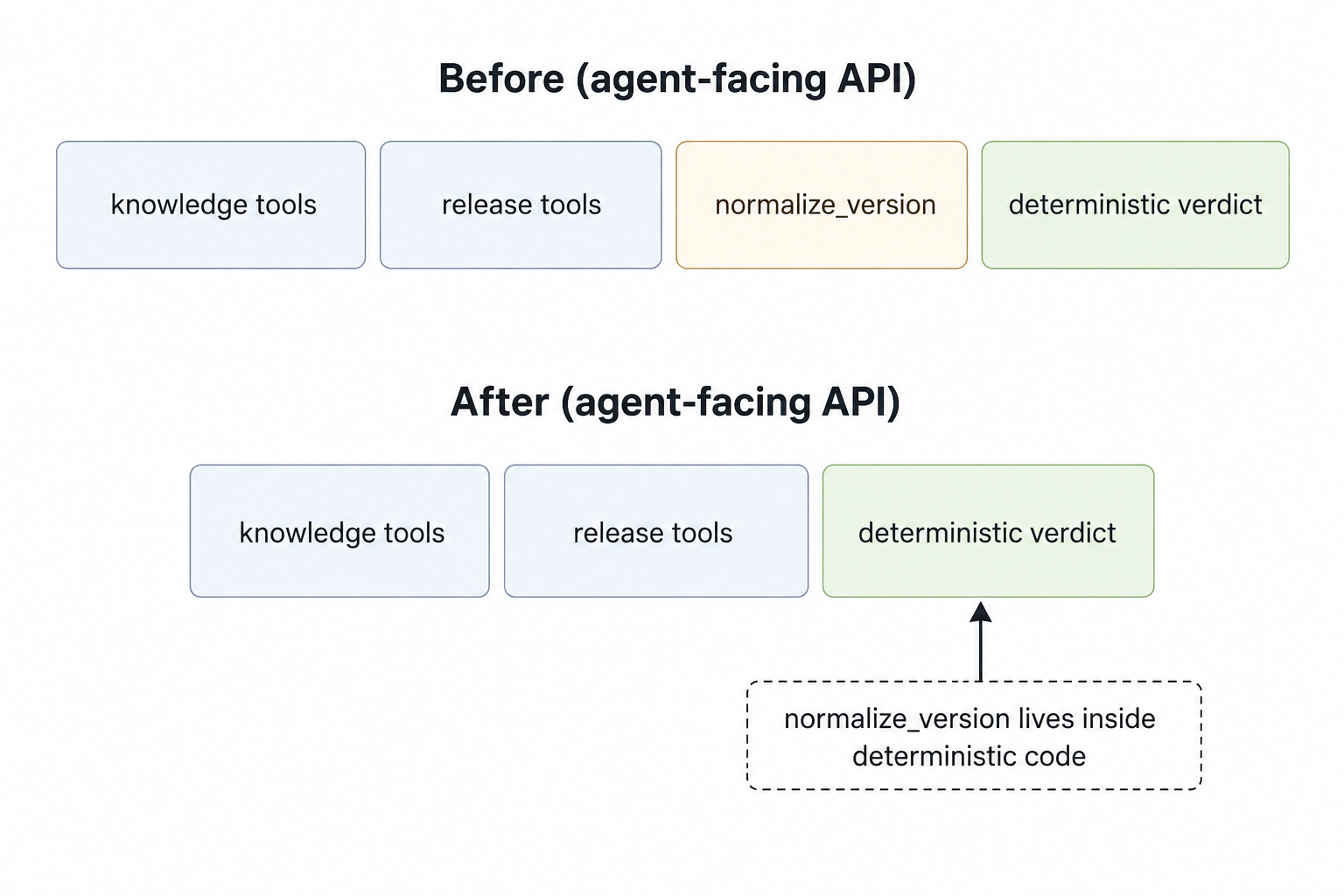
The tool catalog is a public API
The looping call was not a knowledge lookup. It was string hygiene — strip a leading v from a version — exposed as a first-class tool.
In a Temporal + pydantic-ai world, every tool call is an activity. Every accidental press is durable, billed, and visible… after you have already paid.
We re-drew the boundary:
def compute_deterministic_verdict(
    ctx,
    current_version: str,
    releases: list[dict],
    is_eol: bool,
    is_incompatible: bool,
    no_compatible_version_available: bool = False,
) -> dict:
    current = normalize_version(current_version)  # local, free
    # …pure verdict math…
    return {
        "upgrade_recommended": ...,
        "recommended_version": ...,
    }

# Agent tools: retrieval and policy — not string hygiene
tools = [compute_deterministic_verdict, ...]
The system prompt had told the model it must call the normalizer. Prompt and tool surface had been collaborating on the loop. We removed both.
• If a function has no I/O and no policy beyond string hygiene, it is not a tool.
• Tools are for side effects, retrieval, and decisions that need an audit trail.
• Hygiene belongs in deterministic code.
Synthesis
Why usage limits and tool design work together
Either change helps. Together they close the failure mode.
Temporal records every remaining model and tool activity, turning the next anomaly into a concrete history diff that can be investigated immediately.
An optional extra — a per-run dedupe on remaining tools that rejects identical (name, args) — is belt and suspenders. Removing the bad tool removed the fuse we measured.
Operational Clarity
The multi-agent path, still one timeline
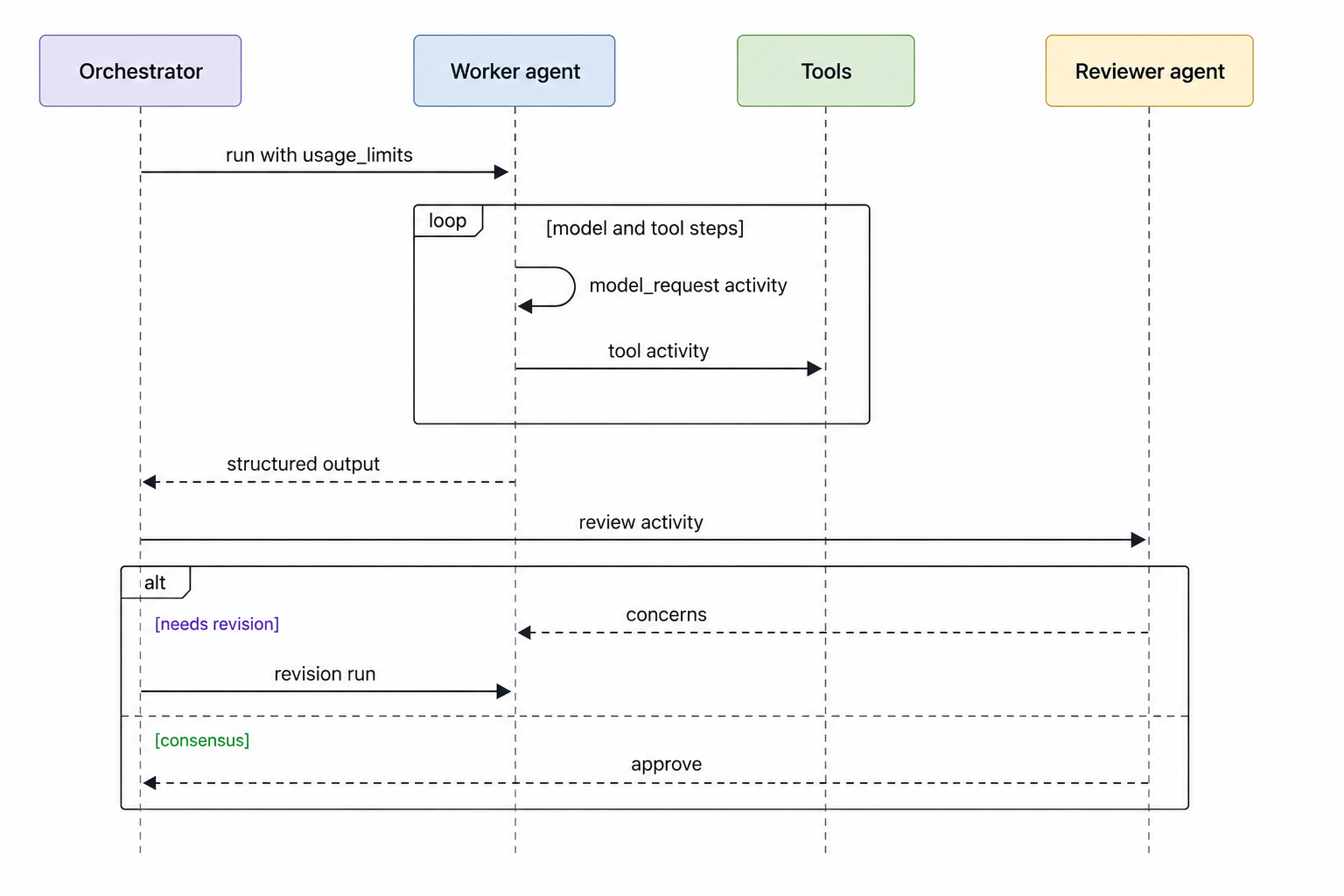
On-call does not ask “which microservice log?” They open one workflow and read worker vs reviewer as chapters in the same book.
| Question | Answered from history |
|---|---|
| Is the worker looping? | Count of model_request / repeated tool names |
| Is the multi-agent path intact? | Reviewer activities after the worker |
| Where is latency? | Activity durations by type |
| Are we paying for quality or waste? | Turns before structured output vs after review |
Outcomes
What the re-engineering delivered
Happy paths were already fine. Averages moved because we changed the shape of the system under stress — which is where multi-agent cost lives.
| Outcome | What changed underneath |
|---|---|
| ~65% cost reduction | Worker budgets and a thinner tool API collapsed long-tail token burn |
| ~70% latency reduction | Loops fail fast; the reviewer stays on the critical path |
| Clearer operations | Orchestrator, worker, and reviewer share one timeline |
| Safer iteration | Next anomaly is evidence, not folklore |
Best Practices
Principles we would take to the next multi-agent build
- 01Orchestrator on Temporal, agents as durable units. Observability comes for free when turns are activities.
- 02Per-agent UsageLimits on every run(). Budgets are part of the multi-agent contract.
- 03Tool catalogs are public APIs. Keep I/O and policy; push pure helpers into deterministic code.
- 04Measure healthy turn counts from history, then set limits. Ours was closer to six worker turns, not fifty.
- 05If the reviewer never appears in history, the architecture did not run. You paid for a solo loop.
If your model turn count is near a framework default you never explicitly selected, your agents are likely spending budget in unmonitored loops.
Closing Takeaway
The Takeaway: Observability Before Optimization
We re-engineered a multi-agent system to achieve better economics through architecture:
- the orchestrator owns cost policy,
- the worker cannot thrash on trivial tools,
- the reviewer remains on the path,
- and Temporal makes the whole graph readable in one place.
The 65% cost and 70% latency numbers are the business result. The lasting win is simpler: multi-agent complexity, with single-timeline observability.
If you are shipping agents in production, export one of your worst Temporal histories and count the model_request activities. If the number is near a framework default you never chose, you have already found the leak.
FAQ
Frequently asked questions
How do you reduce cost in a multi-agent AI system?
Why are multi-agent systems expensive?
How does Temporal help with AI agent observability?
What should count as an AI agent tool?
How do Pydantic AI UsageLimits prevent runaway agents?
Work with Xgrid
Want a second set of eyes on what your Temporal histories are telling you?
If you want a second set of eyes on what your Temporal histories are telling you, Xgrid helps teams review production workflows for reliability, cost, and orchestration issues.
Share Your Details

Established in 2012, Xgrid has a history of delivering a wide range of intelligent and secure cloud infrastructure, user interface and user experience solutions. Our strength lies in our team and its ability to deliver end-to-end solutions using cutting edge technologies.
NAVIGATE
Cloud & DevOps Web & Mobile Apps Temporal Digital Marketing GTM Engineering Marketo Consulting HubSpot Consulting Company Careers ResourcesOFFICE ADDRESS
US Address:
Plug and Play Tech Center, 440 N Wolfe Rd, Sunnyvale, CA 94085
Dubai Address:
Dubai Silicon Oasis, DDP, Building A1, Dubai, United Arab Emirates
Pakistan Address:
Xgrid Solutions (Private) Limited, Bldg 96, GCC-11, Civic Center, Gulberg Greens, Islamabad
Xgrid Solutions (Pvt) Ltd, Daftarkhwan (One), Building #254/1, Sector G, Phase 5, DHA, Lahore
Xgrid © 2026. All rights reserved.